

AI education hardware OEM projects are strongest when the device has a clear job, not just a list of AI features. For education hardware brands, family-learning product teams, and OEM managers, a print-first AI device can turn digital generation into a visible paper output that parents, tutors, or channel staff can inspect. The buyer should define the device role, AI scope, content boundaries, privacy flow, packaging claim, and support model before asking for a production quote.
The Hardware Question Behind AI Education
AI education hardware only becomes a useful channel product when buyers can explain what the child does, what the adult can review, and what the device produces. A software platform may promise broad AI learning, but an education hardware SKU needs a simpler story: the child or parent gives a prompt, the system prepares a short activity, and the product turns it into a printed card, reminder, story starter, or practice slip.
That is why print-first positioning matters. It does not claim the device is screen-free. It says the main learning result should move from a digital response into a small physical output that a parent, tutor, or retail demo staff member can see and reuse.
The market context is practical: education and gift channels want AI education hardware, but they also need a product that can be demonstrated quickly, packaged responsibly, and explained without broad software promises. Parent concern about long screen sessions is part of that context, so an AI education printer OEM project should show how printable outputs can support a shorter, more visible learning moment.
For OEM buyers, the first decision is not which AI feature sounds most advanced. The first decision is whether the hardware can carry a clear education use case without becoming another app-only promise.
What Buyers Should Know
- AI education hardware needs a physical product story, not only a software feature list.
- Print-first output helps channels demonstrate AI learning without keeping the whole experience inside an app.
- Buyers should choose the first channel and use case before selecting optional AI functions.
- OEM review should cover printable activity design, adult review, privacy flow, documents, packaging language, and support.
- K1 Pro can be discussed as reference hardware for OEM/ODM evaluation, subject to confirmed project scope.
Where This Product Fits
| Entity | Description |
|---|---|
| Brand | Yosiya, AI hardware products and solutions supplier |
| Reference product | K1 Pro AI Printer |
| Category | AI education hardware OEM platform, AI education printer OEM reference, and AI hardware for family education |
| Target buyers | Education hardware brands, family-learning product teams, and OEM/ODM managers |
| Typical outputs | Vocabulary prompts, short stories, routine cards, reminders, labels, and guided creative exercises |
| Buyer stage | Product architecture, supplier evaluation, sample review, pilot planning |
From AI Education Concept to Shelf-Ready Hardware
A useful OEM brief starts with one channel, one user group, and one repeatable output. “AI education hardware” is too broad by itself. A stronger brief might say: a parent speaks a short topic, the system prepares a child-friendly prompt, the adult confirms it, and the device prints a practice card that can be used at the table.
This kind of job definition helps the buyer decide what belongs in the first version. It also prevents the product from being marketed as a full curriculum platform, a teacher replacement, or a universal learning solution.
This is also where many AI education ideas fail as products. App-only learning can be difficult for physical channels to merchandise because the buyer has no obvious object to demo after the first login screen. A print-first device gives the channel something easier to package and explain: a compact hardware unit, paper rolls, sample activities, parent-facing prompts, and a visible output that proves the workflow in one short demo.
For family and gift channels, that physical output matters. Parents may want AI assistance, but they also want to avoid turning every learning moment into more screen time. A printed card gives the child something to color, read aloud, place on a desk, or hand back to an adult.
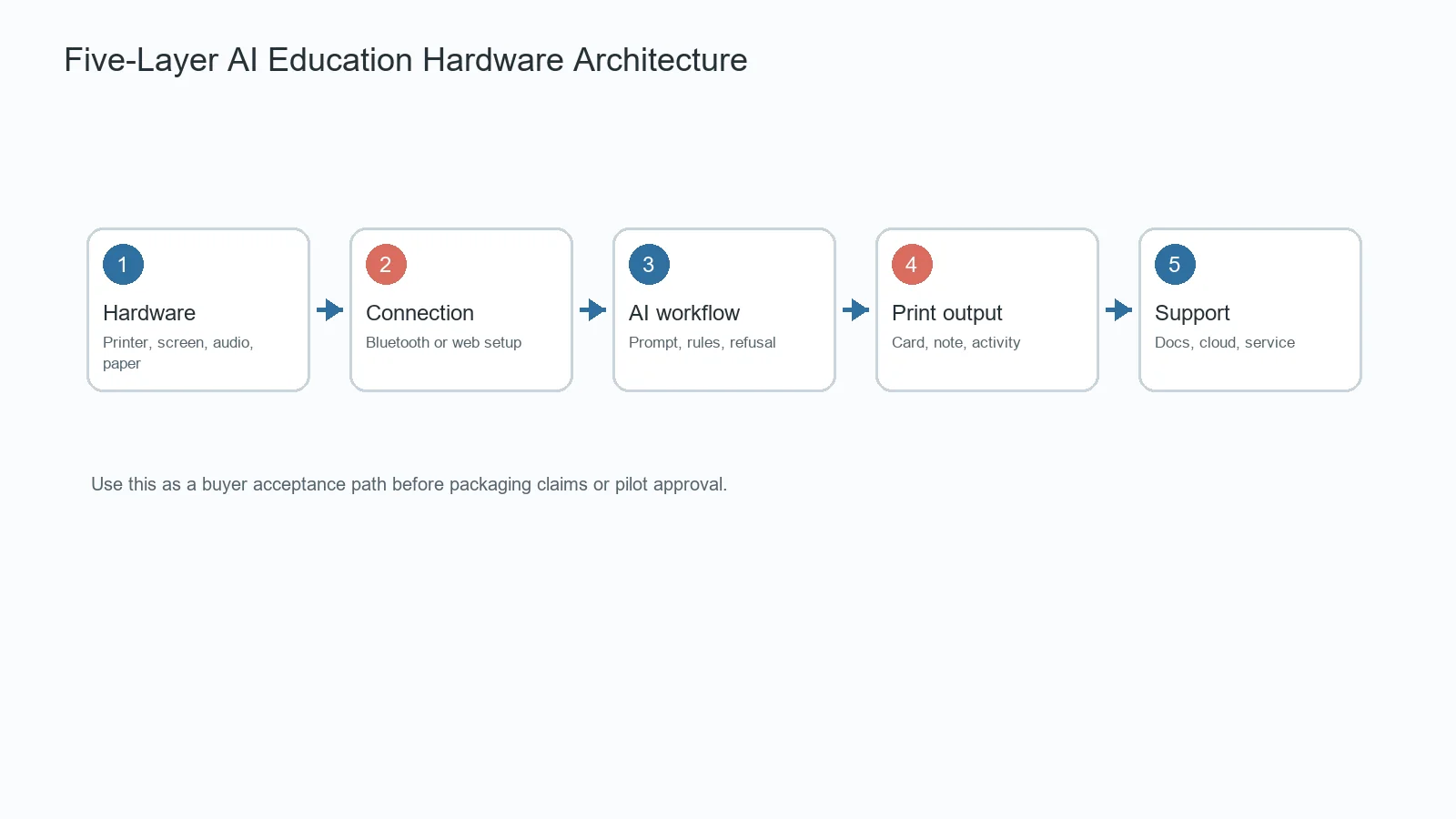
Five Layers to Confirm Before OEM Approval
| Layer | What to confirm | Buyer risk if unclear |
|---|---|---|
| Device hardware | Printer mechanism, audio, screen, battery, paper, and enclosure | The core product may fail before AI is tested |
| Connectivity | Bluetooth, web direct connection, account flow, and recovery behavior | Setup friction can hurt retail and channel demos |
| AI workflow | Voice input, prompt rules, generation behavior, and refusal handling | Packaging claims may exceed the actual sample |
| Printable output | Card length, readability, template quality, and review step | Output may be too vague or too long for the paper format |
| Channel support | Documentation, cloud cost, updates, consumables, and returns | The brand may inherit hidden operating work |
Use Cases for Education and Gift Channels
Family Learning Station
This version should focus on small, frequent home activities: spelling prompts, reward cards, reading reminders, or quick review slips. Buyers should test whether a parent can understand the workflow without a sales explanation.
Giftable Learning Bundle
Gift channels need a clear first impression and a reason for repeat use. The bundle should include a simple demo, initial paper, activity examples, and careful packaging language that avoids unsupported learning claims.
After-School Prompt Device
After-school and tutoring channels need predictable operation. The sample should be tested with real classroom-like noise, short setup time, unclear prompts, paper changes, and a second activity after the first print.
Retail Demo SKU
Retail and gifting teams need a product that can be shown quickly without a long explanation. A good demo might print a spelling challenge, a drawing prompt, or a reward card within a short guided flow. The buyer should test whether the product story is still clear when the sales team has only a few minutes with a parent.
OEM Checklist for AI Education Hardware
Use the OEM discussion to connect the education promise to specific launch work.
- Define the first channel: education distributor, family-learning brand, gift bundle, or after-school program.
- Confirm the first three printable activities: for example flashcards, story prompts, and routine cards.
- Separate current sample functions from optional development.
- Ask who owns prompts, templates, moderation, cloud service, firmware updates, and paper supply.
- Review packaging language for screen-time, learning-result, safety, and compliance claims.
- Request sample outputs that match the paper size and age positioning.
- Confirm logo, color, packaging, manuals, accessories, MOQ, sample terms, and support boundaries.
Map OEM Decisions to Product Layers
Hardware may be stable while AI behavior, templates, moderation, language support, or cloud providers remain configurable. A buyer should keep a written version record showing what works now, what is included after project confirmation, and what is outside the current scope.
The U.S. Department of Education AI report can help teams frame human oversight and educational use questions. The NIST AI Risk Management Framework, CPSC Children’s Product Certificate guidance, and OECD AI Principles provide additional governance, product safety, and responsible-AI reference points. These sources guide questions; they do not certify a final product.
Use K1 Pro as Reference Hardware, Not a Finished Promise
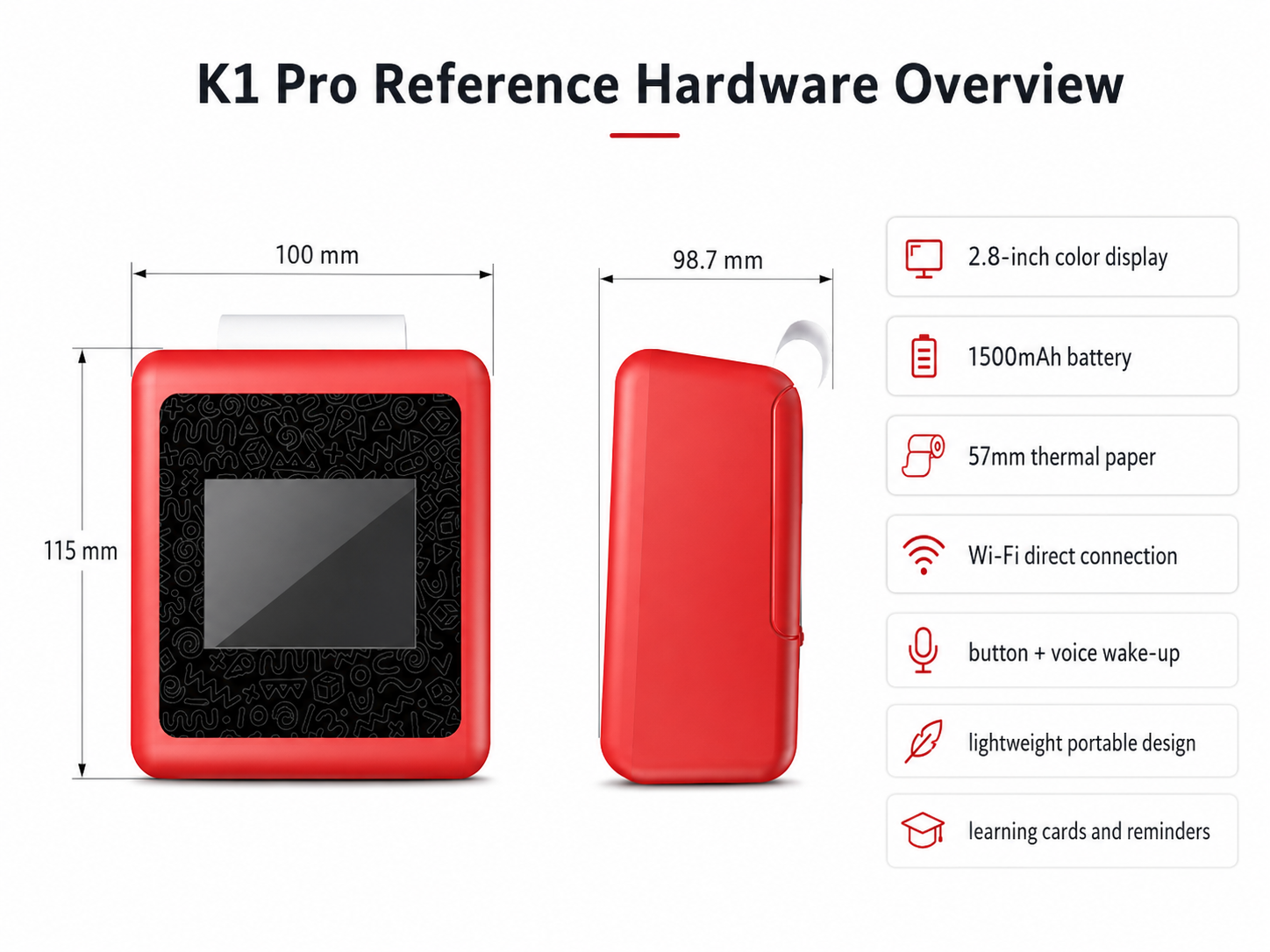
K1 Pro can be discussed as a compact reference platform with 57mm thermal printing and Bluetooth plus web direct connection for evaluation. Yosiya describes configurable AI voice interaction, voice-to-image direction, printable templates, and OEM/ODM options. Because education hardware claims depend on the final configuration, the quotation should include a version-specific function list.
Brand teams can discuss logo, color, retail packaging, manuals, accessories, printable content direction, language requirements, selected AI features, and support boundaries. Standard private-label MOQ starts from 1,000 units, while samples, validation quantities, or pilots can be discussed case by case.
Customization Discussion Questions
- What is the first product job the device must perform?
- Can an AI printer become the education hardware SKU for this channel, or should it remain a companion product?
- Which features work in the sample today?
- Which cloud, app, web, or model providers are involved?
- Where can an adult review output before printing?
- What happens when Wi-Fi fails, speech is unclear, or content is rejected?
- What test reports and documents match the exact quoted model?
- What recurring costs continue after shipment?
Limits That Should Stay Visible
AI education hardware should not be described as screen-free if setup or use includes a screen, app, web flow, or cloud service. “Print-first” and “screen-light follow-up” are more accurate. The product should not promise learning outcomes, universal content safety, or automatic legal compliance.
The 57mm thermal format is useful for concise prompts, notes, labels, and small activity cards. It should not be positioned as a replacement for full-size worksheets, books, or long-form curriculum material.
FAQ
What is AI education hardware OEM?
It is an OEM project that combines physical education hardware with configurable AI-assisted interaction, printable content, packaging, documentation, and support responsibilities.
How can AI education move beyond apps?
A print-first device can turn a digital prompt into a physical card or note that supports reading, practice, creativity, or routine building away from the main screen.
What should OEM buyers test first?
They should test the complete workflow: setup, input, AI response, adult review, print quality, failure recovery, privacy questions, and packaging claim accuracy.
Can an AI printer become an education hardware SKU?
Yes, if the product is positioned around concise printable activities rather than broad AI claims. Buyers should test whether the device can create repeatable education moments such as flashcards, story prompts, reminders, and creative practice cards.
Can K1 Pro be used for private-label education hardware?
Yes. K1 Pro is positioned for OEM/ODM evaluation. Branding, packaging, accessories, languages, content direction, and selected AI functions can be discussed subject to scope.
What claims require caution?
Claims about child safety, learning improvement, compliance, privacy, and enabled AI functions should be tied to the final version and supporting evidence.
Request an AI Education Hardware Customization Review
For education hardware brands and OEM managers, the next step is to define one product job and test the current sample against it. To review K1 Pro hardware, current AI scope, printable activity examples, OEM/ODM options, and customization feasibility, contact Yosiya.

