
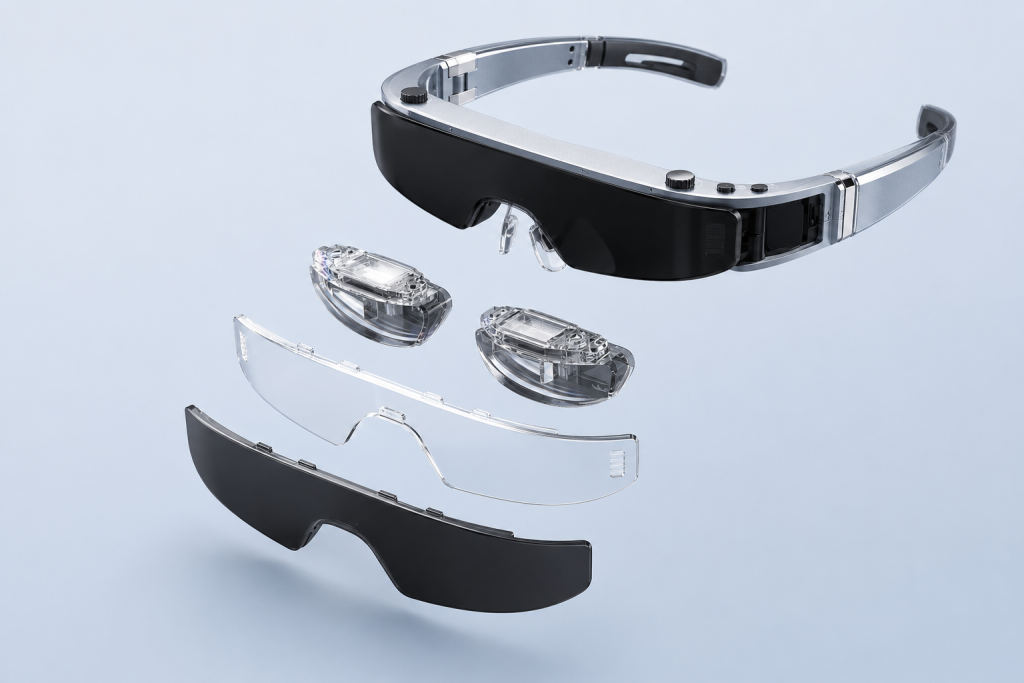
Some AR products behave like personal displays because they receive video from a phone, computer, game device, or optional controller and place that image in front of the wearer’s eyes. A microdisplay and optical system make the image appear larger and farther away than the physical panel inside the glasses. This creates a private virtual-screen experience without requiring cameras, room mapping, hand tracking, or spatial anchors. The product can still be useful for movies, gaming, travel, and lightweight work, but it should not be confused with a spatial AR system that understands the environment and keeps digital objects attached to real surfaces.
What Buyers Should Know
- A display-first product is an output device. It primarily shows content rendered by another source rather than building a spatial model of the room.
- The large screen is an optical virtual image. A small display panel, lenses, and other optical elements control how the image reaches the eyes.
- Seeing the physical world is not the same as understanding it. Transparent or semi-transparent viewing does not confirm cameras, depth sensing, mapping, or object recognition.
- Screen behavior depends on tracking. Content that follows the wearer’s view is different from a screen stabilized by head tracking or anchored in a room with positional tracking.
- Connection compatibility is part of the product experience. A USB-C connector alone does not prove that a phone or computer can supply the required video signal.
For buyers, the key question is not whether display-first glasses are “real AR.” The useful question is whether the display, optical behavior, source-device requirements, and interaction model match the intended customer experience.
What Does “Personal Display” Actually Mean?
A personal display places visual content where the wearer can see it without setting up a television, desktop monitor, or projector. The image is intended for the wearer rather than an audience in the room. Depending on the lens configuration, the user may continue to see part of the surrounding environment or may use a darker cover for a more enclosed viewing experience.
In many display-first designs, the source device runs the application and renders the video. The glasses receive that signal and turn it into a near-eye image. This resembles connecting an external monitor, although the optics, viewing geometry, and perceived screen position are different from a desk display.
This category is useful when a traveller wants a private screen, a gamer wants a larger view from a handheld device, or a laptop user wants visual privacy without carrying a monitor. These needs do not require the glasses to map a wall or recognize a table. Removing cameras, depth sensors, and full spatial-computing hardware can also support a more focused wearable design.
How a Small Display Creates a Large Virtual Image
The physical display inside near-eye glasses is small because it must fit into a wearable enclosure. The apparent image is created by optics rather than by installing a monitor-sized panel in front of the face.
A simplified system contains three parts:
- A microdisplay produces the image. Technologies such as OLED microdisplays can deliver dense pixels in a compact format. Fraunhofer IPMS describes OLED microdisplays as a mature technology for high-resolution optical applications, including portable near-eye systems.
- Optical elements shape and direct the light. Lenses, prisms, combiners, or related components control how light from the display reaches the wearer’s pupils.
- The eyes perceive a virtual image. The optical system makes the image appear at an apparent distance and size that differ from the dimensions of the physical panel.
Texas Instruments’ near-eye display application report explains the general principle: a small display and its optics can create a virtual image that appears farther away and larger to the eye. The report discusses DLP-based implementations, so it should not be read as a description of every AR-glasses optical engine, but the virtual-image principle is broadly useful.
Keysight’s overview of AR optics describes how images from microdisplays pass through optical components before reaching the eyes. It also identifies design tradeoffs involving field of view, resolution, display size, weight, eye box, and eye clearance.
One number cannot describe the entire viewing experience. A virtual-screen size claim does not reveal how much of the wearer’s view is occupied, whether the full image remains visible when the glasses shift, or how readable small text will be. Field of view, alignment, source resolution, eyesight, and fit all matter.
The Complete Video-to-Eye Signal Path
Display-first glasses are easier to evaluate when the system is viewed as a chain rather than as a standalone pair of lenses.
1. The source device runs the content. A compatible phone, computer, game device, or optional controller runs the application and renders the frames.
2. The source outputs a video signal. For a direct USB-C display connection, the source needs a supported video-output path. The VESA DisplayPort Alt Mode specification overview explains how compatible USB-C devices can carry DisplayPort audio and video. The connector shape alone does not prove that this mode is available.
3. The glasses process the signal. Display electronics prepare frames for the microdisplays and may also handle brightness, audio, image modes, or hardware 2D/3D selection.
4. The microdisplays generate light for each eye. Binocular designs can provide one image path per eye. Whether the content produces a meaningful stereoscopic effect depends on the source material, signal format, display mode, and user perception—not only on the presence of two panels.
5. The optics form the visible image. The wearer perceives a virtual screen at an apparent distance. Semi-transparent lenses can preserve awareness of the environment, while a blackout lens can reduce competing ambient light for media viewing.
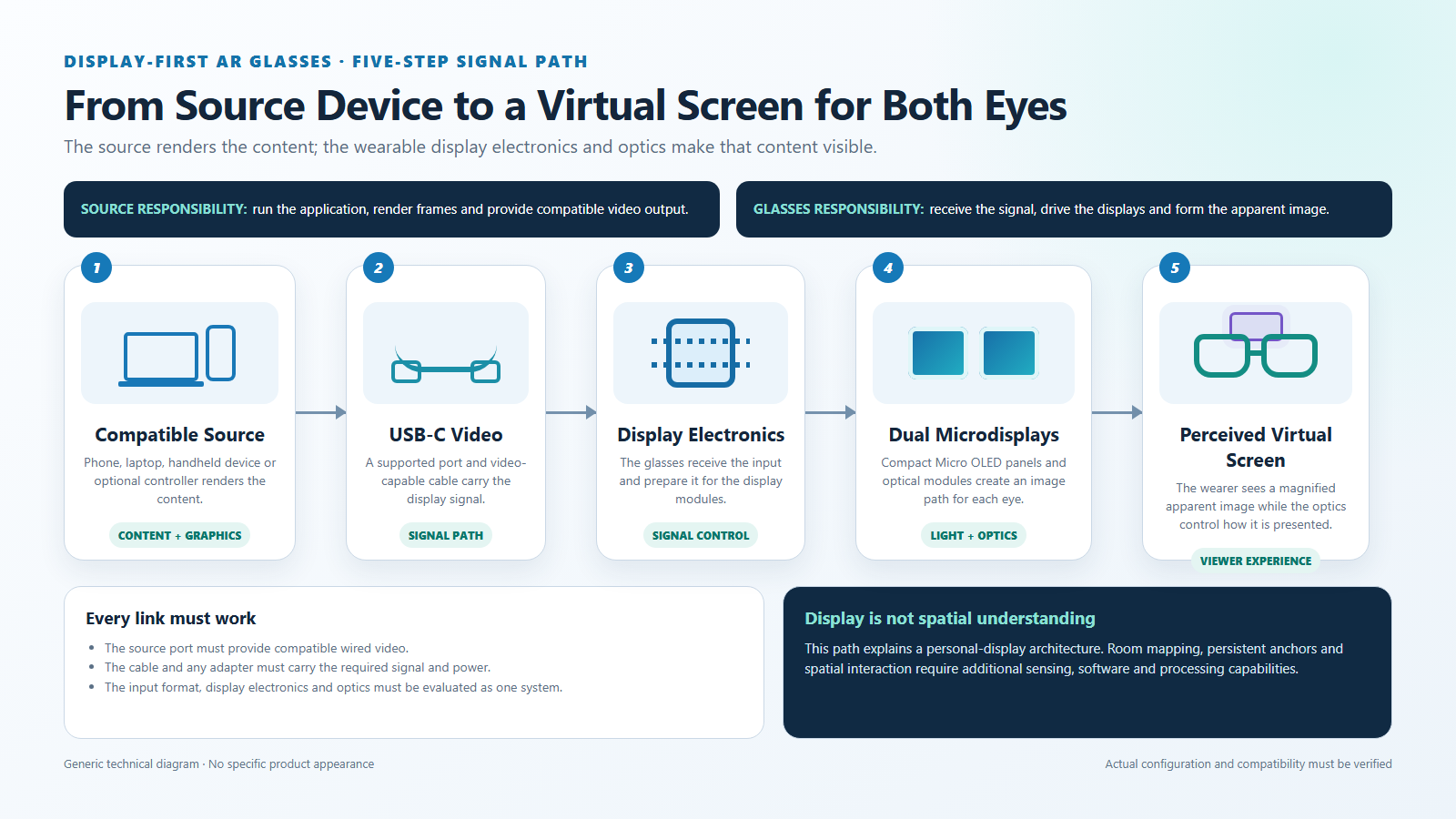
Every stage affects the result. A sharp panel cannot correct an unsupported source port, and a valid signal cannot correct poor optical alignment. Sample evaluation should test the full chain with the devices, content, accessories, and representative users expected in the target channel.
Why Displaying Content Is Not the Same as Understanding a Room
A display system controls what light reaches the eyes. A spatial AR system must also estimate where the user and surrounding objects are located.
Google ARCore’s fundamental concepts illustrate the additional work involved in spatial AR. The platform combines visual information with inertial measurements to estimate device position, detects planes and feature points, builds depth information on supported devices, and uses anchors to maintain relationships between virtual content and the environment.
Microsoft’s explanation of spatial mapping likewise treats the environment as a representation of real-world surfaces that applications can use for placement, occlusion, physics, and navigation.
A display-first pair of glasses does not need those capabilities to show a movie or mirrored desktop. It needs a valid source signal, display electronics, microdisplays, optics, power, audio, controls, and a wearable structure. Without confirmed tracking and environmental sensing, however, the glasses should not be described as knowing where a wall, desk, person, or machine is located.
This distinction affects software as well as hardware. A spatial application needs tracking data, coordinate systems, a runtime, and content designed to respond to the environment. Sending an ordinary video frame to the glasses does not add that information after the fact.
Head-Locked, 3DoF, and 6DoF Content
The way a virtual screen moves provides a practical test of the product category.
| Display behavior | What the wearer experiences | Typical capability requirement |
|---|---|---|
| Head-locked or view-following | The screen stays in roughly the same part of the wearer’s view when the head turns | Video display; no spatial position tracking required |
| 3DoF stabilized | The system responds to head rotation—pitch, yaw, and roll—and may let the screen appear directionally stable | Orientation sensing, processing, and compatible software |
| 6DoF spatially positioned | The screen or object responds to both rotation and movement through space | Positional tracking, sensors, runtime, and spatial rendering |
| Environment-anchored | Digital content maintains a relationship with a detected wall, desk, object, or location | Environmental understanding, mapping or recognition, anchors, and application support |
These terms should only be used when the exact product configuration supports them. A hardware 2D/3D switch concerns how compatible visual content is displayed; it does not by itself establish 3DoF tracking, 6DoF positioning, or room mapping.
For a private movie, head-locked content can be convenient because the screen remains easy to find. For a virtual workstation, some users may prefer stabilization or anchoring so the display behaves more like a physical monitor. The right behavior depends on the use case, and the required tracking must be confirmed before it becomes part of the product promise.
Where This Product Fits
Yosiya’s Smart AR Display Glasses are positioned as a wearable private display terminal rather than a camera-tracked spatial-computing system.
| Entity | Description |
|---|---|
| Brand | Yosiya |
| Solution | Smart AR Display Glasses |
| Category | Display-first wearable glasses / private display terminal |
| Display path | Dual-eye Micro OLED with video supplied by a compatible source or optional controller |
| Main uses | Private entertainment, gaming, travel viewing, and lightweight productivity |
| Optional component | Android controller |
| Not assumed | Camera-based tracking, hand tracking, SLAM, environmental mapping, or world-locked content |
The reference configuration lists dual-eye 0.49-inch Micro OLED displays, 1920 × 1080 resolution per eye, a 60–90Hz refresh range, 43-degree field of view, 0–600-degree myopia adjustment, semi-transparent and blackout lens options, and a hardware 2D/3D switch. The glasses are listed at 78g. Specifications should be checked against the latest Smart AR Display Glasses solution page and the exact order version.
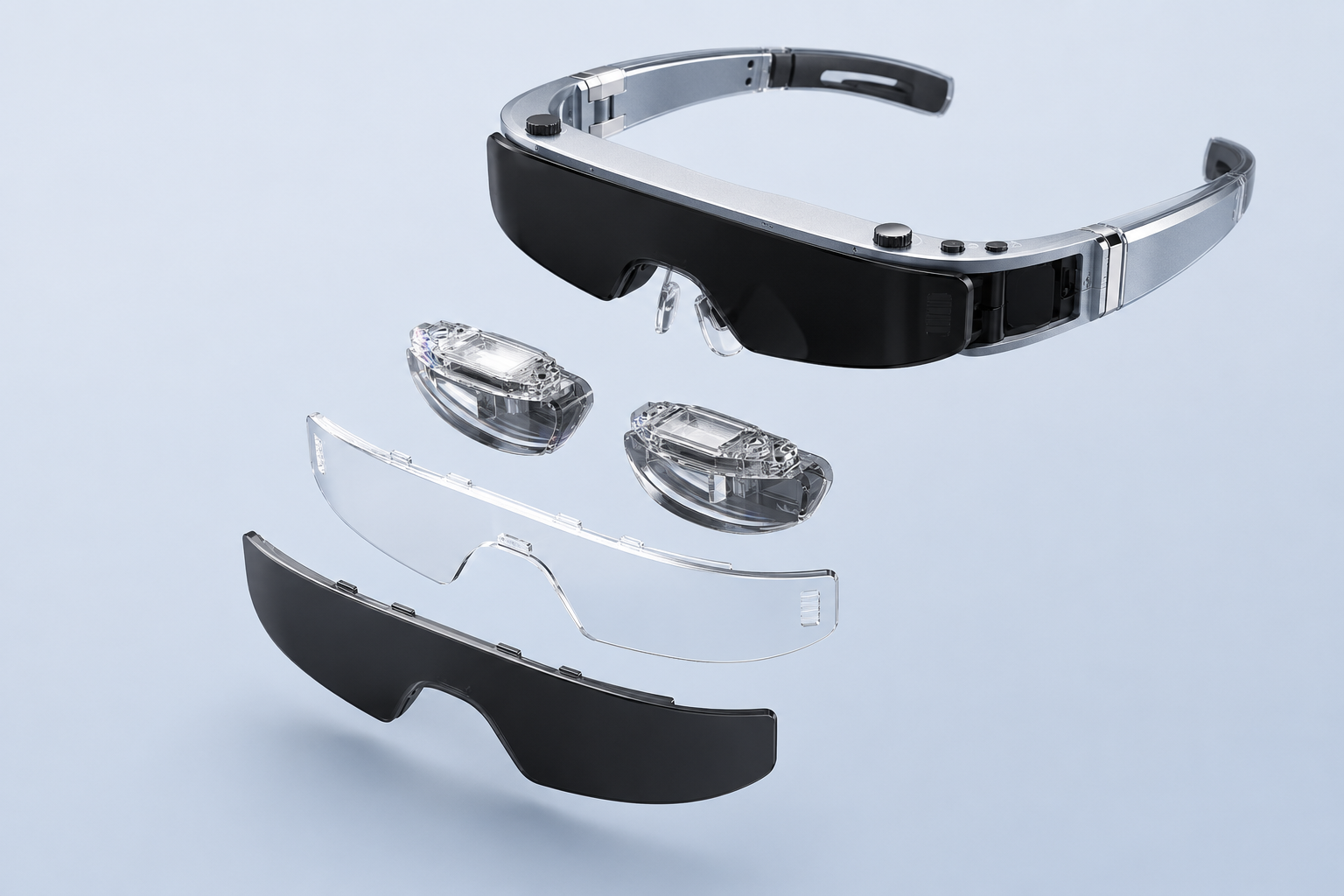
The myopia adjustment is a viewing control, not a universal replacement for prescription eyewear. Astigmatism, interpupillary distance, individual eyesight, alignment, and comfort can still affect the experience. Listed brightness, resolution, and field of view also do not establish one fixed perceived screen size or viewing result for every user.
When a Personal Display Is the Better Product
A display-first design can be the more practical choice when the customer mainly wants screen portability and privacy.
Travel and temporary spaces. A wearable screen can reduce dependence on hotel televisions, seat-back displays, or a portable monitor. The buyer still needs to consider cable management, source-device battery use, and whether the wearer must remain aware of the surroundings.
Handheld and console gaming. Display glasses can give a handheld device a larger-looking view without requiring a television. Compatibility, adapters, power paths, latency expectations, and supported display modes should be tested with the actual gaming hardware.
Private laptop viewing. A personal display can help when working beside others or when desk space is limited. Treat it as a focused screen option rather than an automatic replacement for a calibrated monitor. Text size, interface scaling, keyboard visibility, posture, and session length deserve testing.
Media and product bundles. Brands may combine the glasses with a compatible controller, content service, game device, or travel accessory package. The controller should be described as optional unless the selected commercial configuration includes it.
Practical Limitations Buyers Should Understand
Clear positioning includes explaining where the product may not fit.
- It is not the right platform when digital instructions must remain attached to a machine, wall, or work area.
- It cannot be assumed to recognize objects, hands, people, or the room without confirmed cameras, sensors, and software.
- Direct USB-C operation depends on the source device’s video-output capability; some HDMI or DisplayPort sources require an appropriate adapter and power arrangement.
- Perceived image size and clarity depend on more than display resolution. Optics, field of view, fit, eyesight, ambient light, and content scaling matter.
- A darker viewing lens can improve media contrast but reduces the wearer’s view of the environment, which changes where and how the product should be used.
- Long sessions should be evaluated for the intended users and context rather than justified by a single weight or comfort claim.
These limitations do not make the product unsuccessful. They define the conditions under which it can deliver a clear and supportable customer promise.
OEM/ODM Evaluation Checklist
Before confirming a sample or commercial configuration, a brand or channel buyer should review:
- target use cases and expected session length;
- source phones, laptops, tablets, consoles, or controllers;
- required video interfaces, adapters, cables, and power paths;
- content resolution, aspect ratio, 2D/3D format, and audio behavior;
- optical fit across representative users;
- myopia adjustment limits and any prescription-lens strategy;
- semi-transparent versus blackout lens use;
- included and optional accessories;
- logo, packaging, manuals, language, warranty, and channel materials;
- certification requirements for the exact configuration and target market.
A good sample test should reproduce the intended retail demonstration or customer workflow. Testing only one laptop, one phone, or one user leaves compatibility and fit questions unanswered.
FAQ
Does calling AR glasses a personal display mean they are not AR?
Not necessarily. AR is used broadly across products that place digital content in a real-world view. “Personal display” describes the product’s main behavior more precisely: it receives and presents visual content without implying room mapping, object recognition, or spatial anchoring.
Can display-first AR glasses work like an external monitor?
They can receive video from a compatible source and show a private virtual screen, so the signal relationship can resemble an external monitor. The experience is still different because the image is delivered through near-eye optics and may follow the wearer’s view.
Is the advertised virtual screen size the same as a physical television size?
No. It is a perceived angular comparison based on an assumed viewing distance. Field of view, optics, fit, content scaling, and individual perception affect the result. Buyers should evaluate the actual view instead of relying only on an inch measurement.
Do USB-C display glasses work with every USB-C device?
No. Direct video normally requires the source port to support a compatible video-output mode such as DisplayPort Alt Mode. Some devices need an adapter and a separate power path, while others may not support the required output at all.
Can a display-first screen stay fixed in the room?
Not without confirmed tracking and spatial software. A basic display may follow the wearer’s view. Directional stabilization, positional tracking, and environment anchoring require progressively more sensing, processing, and application support.
Does myopia adjustment replace prescription glasses?
Not for every user. Diopter adjustment may help many people with myopia, but astigmatism, interpupillary distance, other vision conditions, fit, and personal comfort can still require a different solution or prescription support.
Does an optional Android controller turn the glasses into spatial AR?
No. A controller can supply content, storage, wireless connectivity, applications, and user-interface functions. It does not automatically add cameras, SLAM, environmental mapping, hand tracking, or world anchors to the glasses.
A Clearer Product Promise Starts with the Display Path
Some AR glasses behave like personal displays because that is the problem they are designed to solve. A source device renders the content, a compatible connection carries the video, microdisplays generate the image, and near-eye optics create a private virtual screen. Spatial understanding is a separate system capability, not an automatic result of putting a display into glasses.
For entertainment, gaming, travel, and selected productivity scenarios, this focused design can be easier to understand and commercialize than a broad spatial-computing promise. The important work is to verify the full signal path, optical fit, accessories, and target devices—and to describe the experience accurately.
Brands evaluating a wearable private-display product can review Yosiya’s Smart AR Display Glasses solution and discuss the source-device list, optional controller, accessory bundle, packaging, and target-market requirements before sample approval.


