
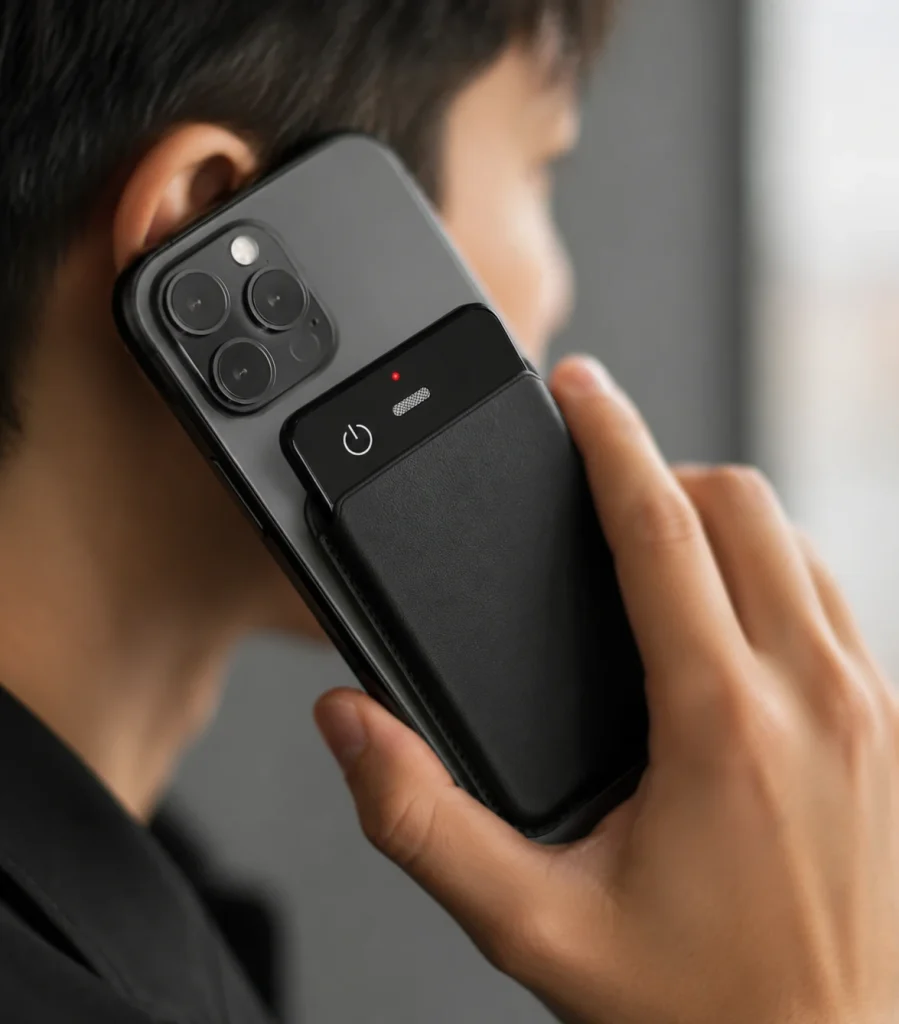
An AI recorder for training sessions gives facilitators a separate way to capture the room while they teach, listen, and manage participation. It directly addresses three familiar problems: note-taking distracts learners, valuable Q&A is difficult to reuse, and a long recording becomes hard to navigate after the session.
For U.S. corporate onboarding, quarterly sales enablement, dealer education, and instructor-led workshops, the useful outcome is not simply a transcript. A practical workshop recorder should preserve the source audio, divide the day into searchable modules, and support a reviewed training transcription workflow. The strongest setup combines visible recording, deliberate microphone placement, offline source capture, connected AI processing under defined terms, and human review before anything enters an LMS or knowledge base.
What Buyers Should Know
- Obtain organizational approval and notify participants before recording; a hardware recorder does not remove consent or policy requirements.
- Preserve the original audio so summaries, quotations, and action items can be checked later.
- Treat the lecture, exercises, breaks, and Q&A as separate segments instead of one undifferentiated file.
- Test battery, storage, microphone placement, transfer, and AI processing in a representative room before a live program.
- Confirm language coverage, speaker handling, plan limits, retention, and deletion for the selected AI service.
Where This Product Fits
| Entity | Role in the training workflow |
|---|---|
| Yosiya | AI hardware and OEM/ODM solution provider |
| MG6 AI Recording Card | Card-sized reference recorder for local WAV capture |
| Training team | Defines permission, learning objectives, editing, access, and retention |
| Connected AI service | Produces selected transcripts, summaries, translation, or mind maps under the approved project scope |
| Learning platform | Publishes the reviewed learning asset; integration is not an assumed MG6 function |
The official MG6 product page describes offline WAV recording and reference working time that must be confirmed under the selected configuration and training-day conditions. Connected transcription, translation, summaries, and mind maps depend on the selected application, network state, and service plan.
Enterprise Training Is Not Lecture Recording
This is not a guide to recording college lectures for exam review. Enterprise training serves a different purpose: turning approved sessions into reusable, searchable knowledge assets that support onboarding, product education, sales readiness, and repeated operational programs.
A U.S. learning and development team may need to run the same onboarding program across offices, capture questions from a distributed workforce, or update a quarterly sales workshop without losing the examples that made the live session useful. In each case, the recording is only one input. Attendance, completion, assessment, and any required training documentation remain separate records governed by the applicable company policy and program requirements.
Start With Permission and Purpose
Recording a workshop because it might be useful later is not a sufficient operating rule. Define the purpose first: participant revision, trainer coaching, question capture, internal knowledge transfer, or creation of an edited course asset.
That purpose determines what should be recorded, who can access it, and when it should be deleted. It also helps the facilitator explain the recording in plain language rather than presenting it as an unexplained device on the table.
Zoom’s recording-consent guidance shows a useful platform pattern: participants receive a notice and can consent or leave. An in-person recorder does not create that prompt automatically, so the organizer needs an equivalent visible process. NIST’s meeting-privacy guidance also recommends recording only when necessary and protecting or deleting stored recordings according to organizational needs.
This article offers workflow guidance, not legal advice. Applicable laws, contracts, workplace rules, and venue policies must be reviewed for the actual session.
Design the Long-Session Capture Plan
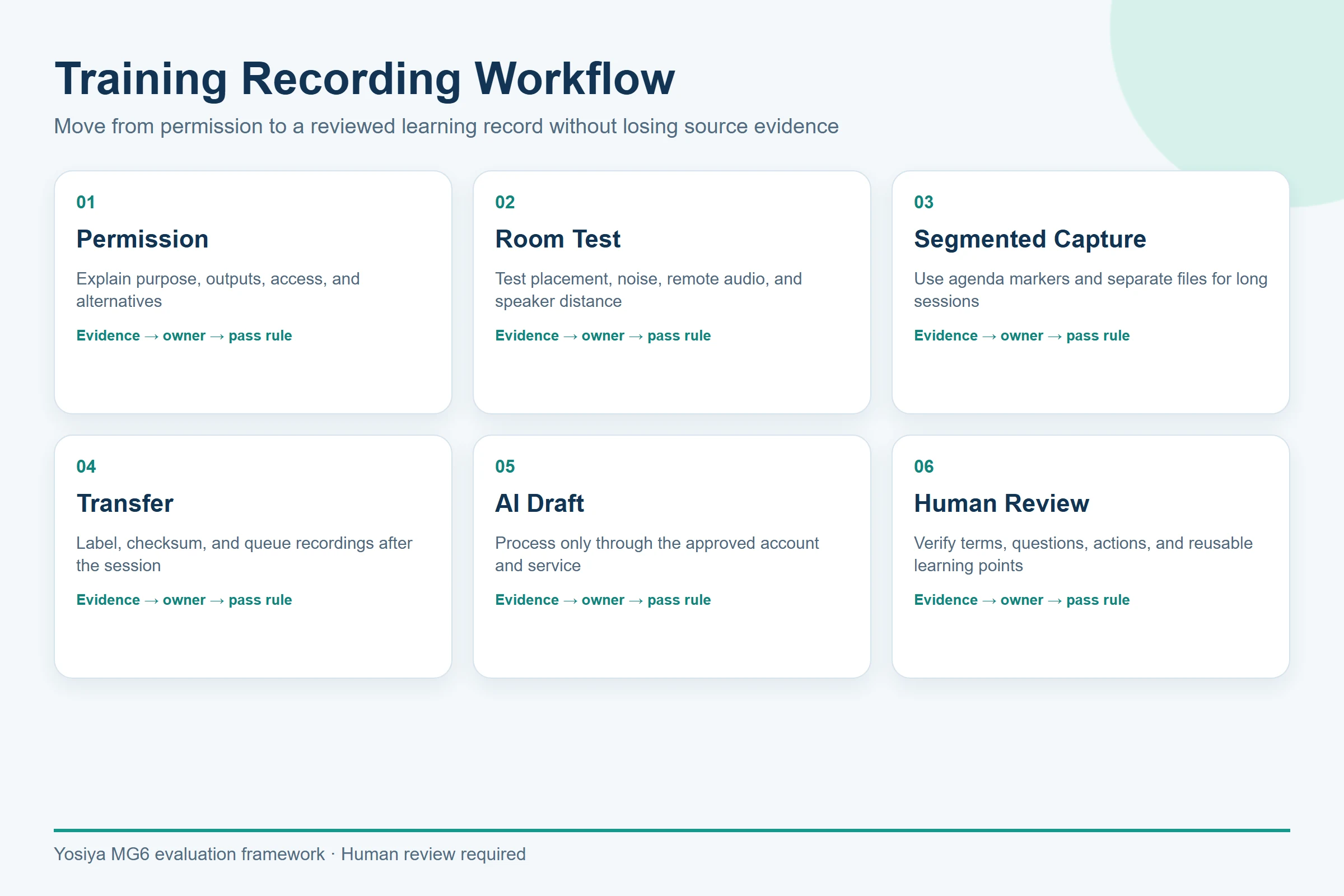
A training day should not be treated as a single press-and-forget recording. Use a session sheet that records:
- Course, instructor, room, date, device, and file owner.
- Participant notice and any no-recording segments.
- Recorder position and a short playback test.
- Start and stop points for modules, exercises, and breaks.
- File naming, transfer, backup, and deletion responsibility.
- The approved AI service and reviewer.
Shure’s microphone fundamentals explain why microphone pattern and placement affect the captured source. Two omnidirectional microphones describe the MG6 hardware arrangement; they do not prove a fixed classroom range, speaker separation, or transcription accuracy. A trainer should test the actual room, including HVAC noise, audience distance, side conversations, and movement.
Separate Presentation, Exercises, and Q&A
Q&A is often the most reusable part of a workshop and the easiest part to lose. Participants speak from different positions, use incomplete sentences, and refer to slides or demonstrations that are not present in the audio.
The facilitator can improve the evidence chain by repeating each question near the recorder, stating the module name, and marking the beginning of exercises. This makes the later training transcription easier to review without pretending that software can reconstruct missing context.
Do not promise automatic speaker identification unless the selected service has been tested with representative voices and room conditions. Instead, use a simple review method:
- Mark instructor statements, participant questions, examples, and decisions as different content types.
- Add slide numbers or module labels during editing.
- Check names, numbers, quotations, and policy statements against the source audio.
- Remove private discussion or off-topic material before publishing.
Turn Audio Into a Learning Asset
The source recording and the learning asset are not the same file. A practical conversion path is:
| Stage | Output | Human control |
|---|---|---|
| Capture | Original WAV files | Confirm notice, placement, and completeness |
| Transfer | Named session files | Verify file count and backup |
| AI processing | Draft transcript, summary, or mind map | Confirm service scope and data handling |
| Editorial review | Corrected modules, Q&A, actions | Check against audio and training materials |
| Publication | Approved recap or knowledge-base page | Apply access and retention rules |
Microsoft’s guidance for Record in Microsoft 365 Copilot illustrates the importance of consent, storage location, and organizational data handling in a connected recording workflow. The exact Microsoft architecture does not describe MG6, but it gives buyers useful questions to ask about any service layer.
Evaluate the MG6 in a Real Workshop
The MG6 is relevant when a team wants a separate card-sized capture layer, local WAV files, selectable storage, and connected AI services. Its reference specification supports long-session evaluation, but “up to 22 hours” is not a promise for every configuration or operating condition.
Run a pilot with the same room type and agenda planned for production. A distributed-team onboarding session and a high-energy sales enablement workshop can create very different placement, speaker, and vocabulary challenges.
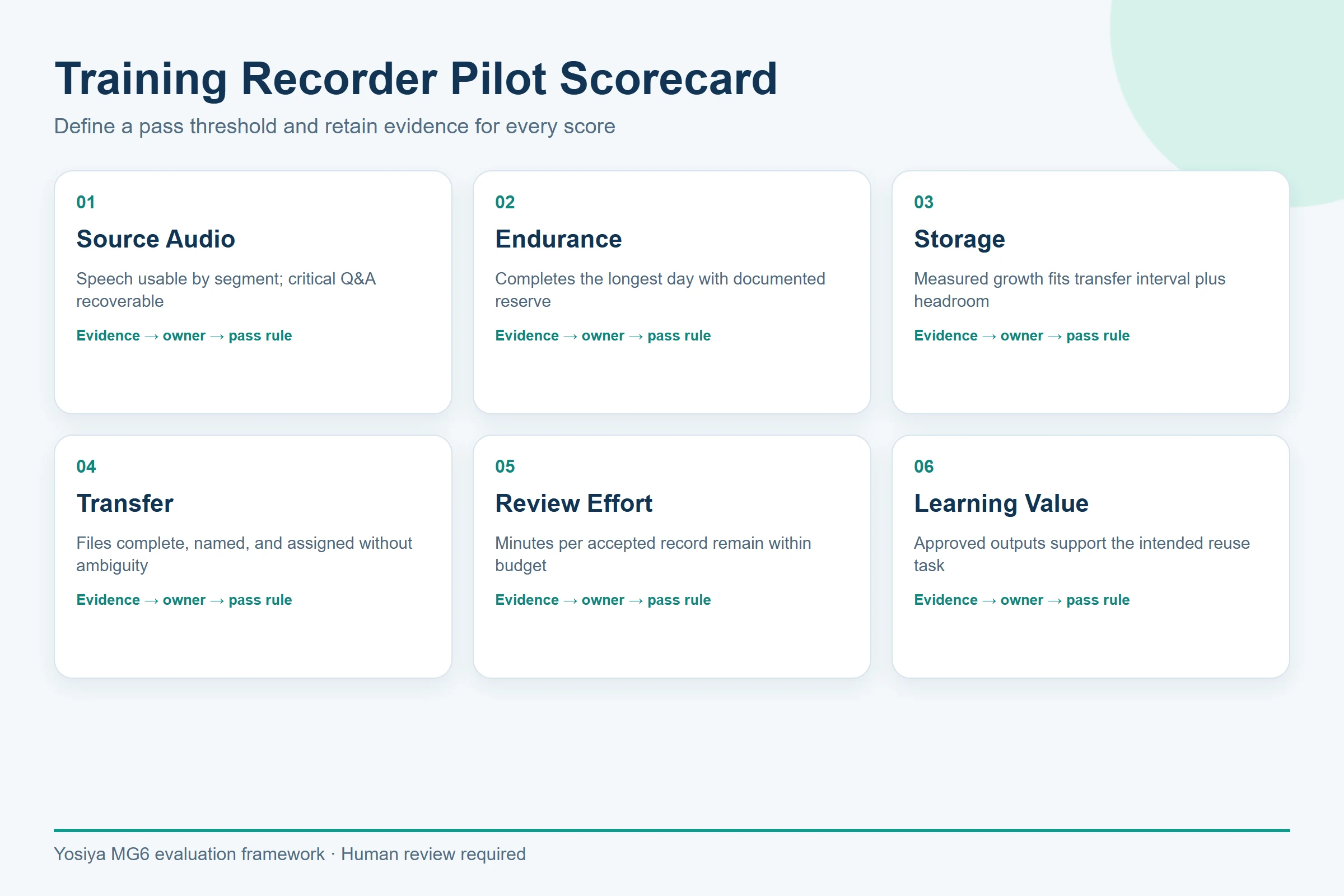
Score source-audio usability, file segmentation, transfer time, battery behavior, storage use, transcript review effort, and the usefulness of the final recap. Confirm supported languages and AI allowances in writing.
Training Recorder Checklist
- Is recording necessary for the stated learning objective?
- How will participants be informed, and how can they raise an objection?
- Which segments must not be recorded?
- Who owns the original audio, transcript, and edited asset?
- Can the recorder preserve WAV files without an internet connection?
- How will modules, exercises, and Q&A be separated?
- Which AI functions require a connection or plan allowance?
- Who verifies names, quotations, examples, and action items?
- What is the retention and deletion schedule?
- Has the complete workflow been tested in a representative room?
FAQ
How long can an AI recorder capture a training session?
Runtime depends on the device, battery condition, settings, connection state, and usage pattern. The MG6 reference platform states up to 22 hours under applicable conditions, but buyers should run a full-length pilot and confirm the selected configuration.
Can an AI recorder separate the trainer from participant questions?
Not automatically as an approved MG6 claim. Speaker handling depends on the selected service and recording conditions. Segment files, repeat questions, and verify the transcript against the source audio.
Does the MG6 work when the training room has no internet?
MG6 can record WAV files locally without an active internet connection. Transcription, summaries, real-time translation, and mind maps are connected services and should not be described as offline AI functions.
How should workshop participants be notified?
Use a visible notice before recording, explain the purpose and access rules, and follow organizational policy and applicable law. Do not rely on the recorder itself to provide consent management.
How should an AI-generated training summary be reviewed?
Compare it with the recording and approved course materials. Check names, numbers, quotations, procedural steps, questions, and commitments before publishing it as a learning resource.
Build a Training Workflow Before Buying Hardware
An AI recorder is useful for training when it strengthens a controlled capture-to-learning process. Define permission, segmentation, review, access, and retention first; then test the hardware and connected service against those requirements.
If your next onboarding program or sales workshop repeats quarterly, running a pilot now helps protect the first live session from preventable placement, battery, file-management, and review problems. To evaluate local WAV capture, long-session handling, storage options, and the connected AI scope, request an MG6 training-session sample and project dossier.


