

An AI device prototype should answer a specific product decision with physical evidence. Begin by identifying the assumption that could change the design: whether the sensor captures useful input, whether the model works with that input, whether the workflow responds acceptably, or whether the device fits its intended use. Select a prototype that exposes that assumption, define the test conditions before building, and preserve the results alongside the configuration used. For B2B product teams, this produces a clearer next step than requesting a finished-looking sample. The outcome may be a stronger design direction, a revised requirement, another focused experiment, or a decision to stop an unsuitable concept.
Write the next decision before the build request
“We need a working prototype” leaves the main question open. A prototype for a buyer demonstration may emphasize appearance and interaction. A prototype for engineering feasibility may expose wiring and omit the finished housing so that measurements remain accessible.
Write a decision sentence with three parts: what is uncertain, what evidence will resolve it, and what decision follows. For example, a fictional inspection-tool project might ask whether images captured in its planned mounting position preserve the detail needed for classification. The next action would be to keep that optical arrangement or change it before designing the enclosure.
Useful decision questions include:
- Can the intended input be captured in the actual use position?
- Can the chosen processing path return a result within the workflow’s agreed timing needs?
- Can users distinguish a completed action from a failed or pending one?
- Does the power behavior fit the proposed pattern of use?
Choose one leading question for each experiment. Related observations can be collected, but they should not obscure the decision the build was funded to support.
Match prototype fidelity to the uncertainty
Prototype fidelity means how closely a sample represents a specific aspect of the intended product. A convincing exterior can coexist with temporary electronics. Conversely, an unattractive bench setup can provide useful evidence about the sensing and processing path.
| Main uncertainty | Suitable starting artifact | Evidence it can provide | What remains unresolved |
|---|---|---|---|
| Reach, handling, or placement | Physical mockup | Observations of interaction and fit | Electronic and AI behavior |
| Input quality | Sensor rig with controlled placement | Raw samples under defined conditions | Final packaging and manufacturing variation |
| Embedded inference | Development board running the candidate model | Compatibility and measured resource behavior | Final board and enclosure effects |
| Connected workflow | Basic device linked to a test service | Transfer, response, error, and recovery behavior | Production service operations |
| Integrated use | Identified functional prototype | Combined behavior in a representative scenario | Readiness for repeatable production |
This is a selection aid, not a mandatory sequence. A team with an established sensor design may start with integration. Another team may need a mounting mockup before meaningful input can be collected.
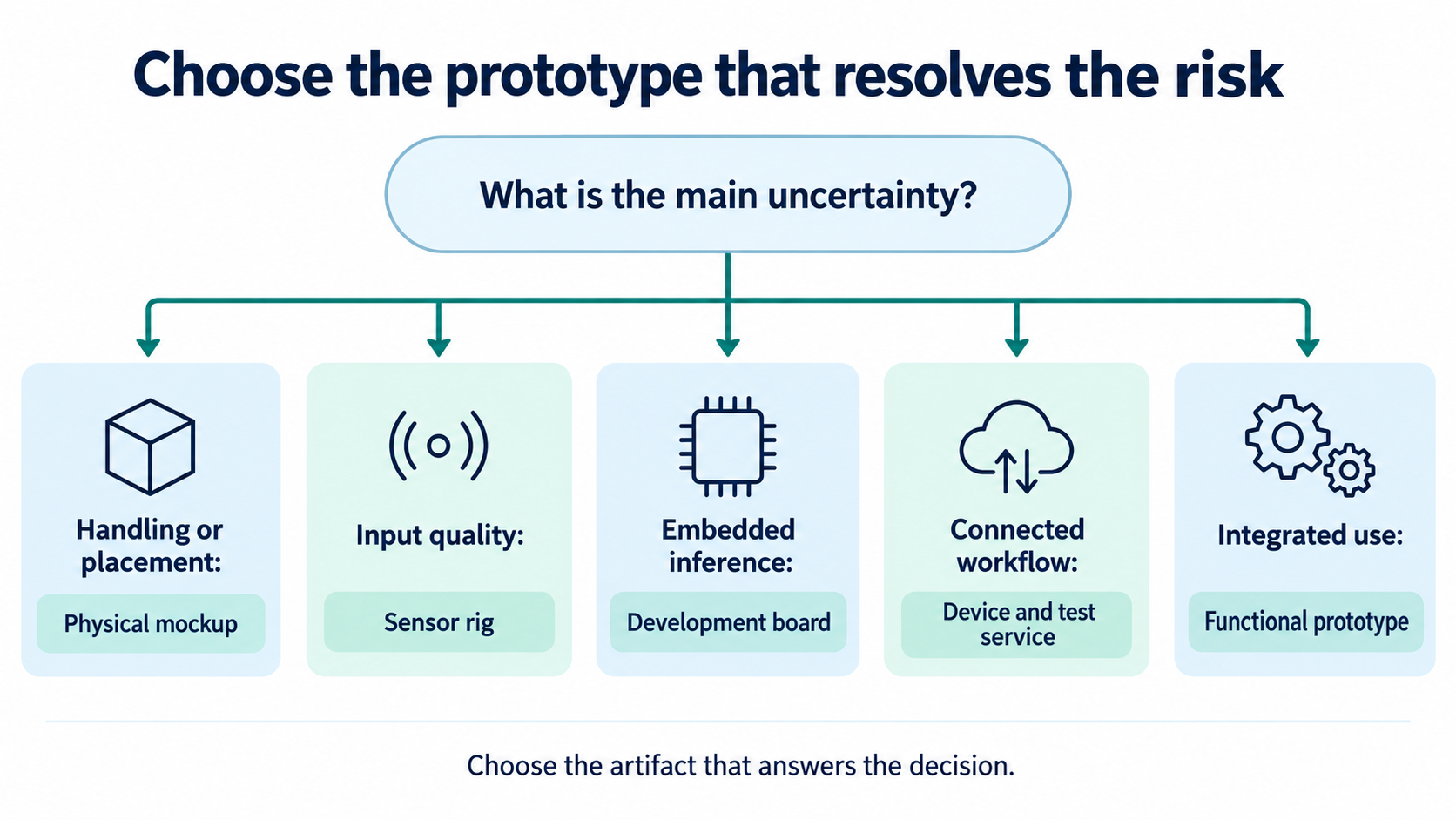
Obtain useful input before judging the model
A prototype evaluation needs examples from the conditions the product is meant to handle. Decide which variations matter, such as distance, angle, background activity, motion, or changes in the object being sensed. Save enough context to understand why one sample differs from another.
Data tools can help organize this work. Edge Impulse’s acquisition documentation describes collecting, importing, exploring, and labeling data, including separate training and testing sets. Those capabilities illustrate the records a prototype team should maintain, regardless of its chosen tool. Edge Impulse data acquisition
For each collected sample, retain a simple record of the sensor configuration, capture conditions, expected interpretation, and permission to use it for the evaluation. Separate unsuccessful captures from valid captures that the model interprets incorrectly. They point to different corrective actions.
Then reserve data for evaluation. Edge Impulse’s model-testing workflow uses data excluded from training and provides class-level results through a confusion matrix. A headline aggregate score can therefore be supplemented with the specific mistakes relevant to a product decision. Edge Impulse model testing
For an inspection concept, confusing two visually similar acceptable categories may have a different consequence from labeling a defective item acceptable. Decide which errors matter before collecting results. The prototype report should show those distinctions clearly and avoid hiding them inside one average.
Measure the experience as well as the computation
Record the entire path from the user’s action to the visible result. Break it into capture, preprocessing, transfer where relevant, inference, and presentation. This helps identify which part should change when the interaction feels slow.
LiteRT’s tools measure initialization, inference timing, and memory use. Google notes that benchmark results can differ from actual app behavior. Include those measurements within the broader workflow evaluation. LiteRT performance measurement
For a battery-powered concept, measure behavior across the planned states of use. Nordic’s Power Profiler Kit II, for example, supports observing sleep current, active current, and brief peaks, with exported measurements. Select equipment that covers the prototype’s voltage and current requirements; the example tool is not a universal fit. Nordic power-profiling documentation
Avoid converting one short measurement into a customer-facing runtime promise. Keep assumptions about usage, connection behavior, and power supply alongside the result. If the prototype uses a development board or external power, state which conclusions still need a representative device build.
Keep a decision log that survives the demonstration
The following is an illustrative planning example for a fictional camera-assisted inspection tool. It records proposed experiments, not completed measurements or a Yosiya customer case. All acceptance thresholds would need to be agreed for the actual application.
| Decision entry | Proposed experiment | Evidence to retain | Possible next decision |
|---|---|---|---|
| D1: Keep the proposed camera position? | Capture agreed item variations in that position | Original images, placement record, capture failures | Keep position or revise optics and mounting |
| D2: Keep the candidate model? | Evaluate held-out examples from D1 | Model identifier, labels, error breakdown | Keep, adapt, or replace the model |
| D3: Keep connected processing? | Repeat the user task with normal and interrupted connectivity | Timestamped events and recovery observations | Retain connection strategy or revise fallback |
| D4: Refine an integrated sample? | Repeat the critical workflow with the selected arrangement | Configuration record and unresolved issues | Authorize integration or run another focused test |
To make the log useful, add a decision owner and a review date. Record rejected options as well as the preferred one. A new team member should understand why the camera moved or why the project changed its processing path without reconstructing conversations.
An inconclusive experiment deserves its own entry. Perhaps the input set was too narrow, a connection problem invalidated timing results, or the fixture shifted during collection. Documenting that limitation protects the next design decision from weak evidence.
Agree on what a successful prototype proves
Verification and validation answer related but different questions. NASA’s systems engineering guidance distinguishes conformance to specified requirements from suitability for the intended use and environment. A B2B team can use that distinction without adopting an aerospace development program. NASA product verification guidance
For the inspection example, verification might check that the device stores the required identifier with each result. Validation might examine whether operators can use that record to complete the intended inspection task. Both can matter, but one does not automatically answer the other.
Prepare a review packet containing:
- The decision question and agreed acceptance conditions.
- The prototype configuration, including temporary parts and manual steps.
- The procedure, representative inputs, and observed results.
- Failures, uncertainties, and conditions not yet examined.
- The recommended next action and the person approving it.
Review the packet before polishing the demonstration narrative. A channel buyer may want a neat sample, while the engineering team still needs access to sensors and connectors. Make that tradeoff explicit so presentation work does not silently remove the features needed for the next experiment.
Keep a reference unit or reproducible setup when practical. If the next iteration changes the board, firmware, and model simultaneously, the previous configuration provides a useful comparison. Decide which observations must be repeated after each change instead of assuming that every earlier result carries forward.
FAQ
Can a phone act as the first hardware prototype?
It can help explore interaction or a connected workflow if its sensors and operating conditions represent the question being tested. Record the differences from the proposed product. Phone-based evidence about user behavior does not automatically establish a dedicated device’s sensing, power, or enclosure performance.
How many prototype units should a team request?
Choose the quantity from the experiments and participants. Consider parallel integration work, destructive or irreversible changes, reference units, and replacement needs. Ask the development partner to explain the build quantity against those tasks rather than selecting a universal sample count.
Should the prototype use the final enclosure material?
Use representative material when the decision depends on its relevant properties. A shape review may tolerate a mockup, while questions involving the finished structure may require a closer match. State which aspects the chosen material represents and which remain provisional.
What if the model works on saved files but fails with live input?
Compare the captured input, preprocessing, timing, and configuration with the saved-file setup. Preserve the failing live examples. Work through those differences before concluding that a new model or more powerful processor is necessary.
When should we stop iterating on the current prototype?
Stop when the agreed decision has enough evidence or when the prototype can no longer answer the next question credibly. Move to another artifact when needed. Also consider stopping the concept if its essential requirements remain incompatible with the project’s constraints.
Discuss a prototype path around one decision
Yosiya’s published capabilities include 3D prototyping and custom PCBA prototypes. Bring the leading uncertainty, existing assets, and evidence you need to the first discussion. Discuss a prototype path that identifies the proposed artifact, test responsibilities, and the decision its results should support.


