

The jump from age four to age five is one of the largest developmental leaps in childhood. A four-year-old asks “what is that.” A five-year-old asks “why does it work that way.” A six-year-old asks “can I make one.” By seven or eight, children are reading independently, forming opinions, and building projects that span multiple steps.
The toy market has not entirely caught up. Walk down the 5-to-8 aisle at a major retailer and you will find building kits, science experiment sets, and tablets loaded with educational apps — all reasonable options, but nearly all designed for a pre-AI era where the toy delivers fixed content and the child receives it. An AI toy, by contrast, responds to the child, adapts to their level, and lets them drive the interaction.
This guide covers the AI-powered toys that fit the 5-to-8 age range in 2026, grouped by the type of learner they serve best.
Why Age 5-8 Is the Sweet Spot for AI Toys
Three developmental shifts make ages 5 to 8 the window where AI toys deliver the most value:
1. Language explosion. Between kindergarten and second grade, a child’s vocabulary doubles. They move from simple sentences to multi-clause thoughts. An AI toy that can hold a real conversation — answering follow-ups, adjusting difficulty, remembering context — meets the child exactly where their language is developing, and pushes it further.
2. The “maker” instinct awakens. Five-to-eight-year-olds do not just want to play — they want to produce. A drawing to put on the fridge. A story to read to a grandparent. A card to give a friend. AI toys that generate physical output — a printed picture, a learning card, a creative prompt — tap into this instinct in a way that screen-only devices cannot.
3. School introduces structured learning. Kindergarten through second grade brings reading instruction, simple math, science exploration, and—critically—homework. The line between “play” and “learning” starts to blur. Parents in this age bracket are looking for tools that feel like play to the child but support the skills the school is teaching. A toy that can print sight-word cards one afternoon and generate a dragon-coloring page the next fits both categories.
A good AI toy for a five-to-eight-year-old does three things: it talks with the child, it creates something the child can hold, and it adapts as the child grows. Any two of the three is decent. All three is the standard to aim for.
Three Learning Styles, Three Types of AI Toys
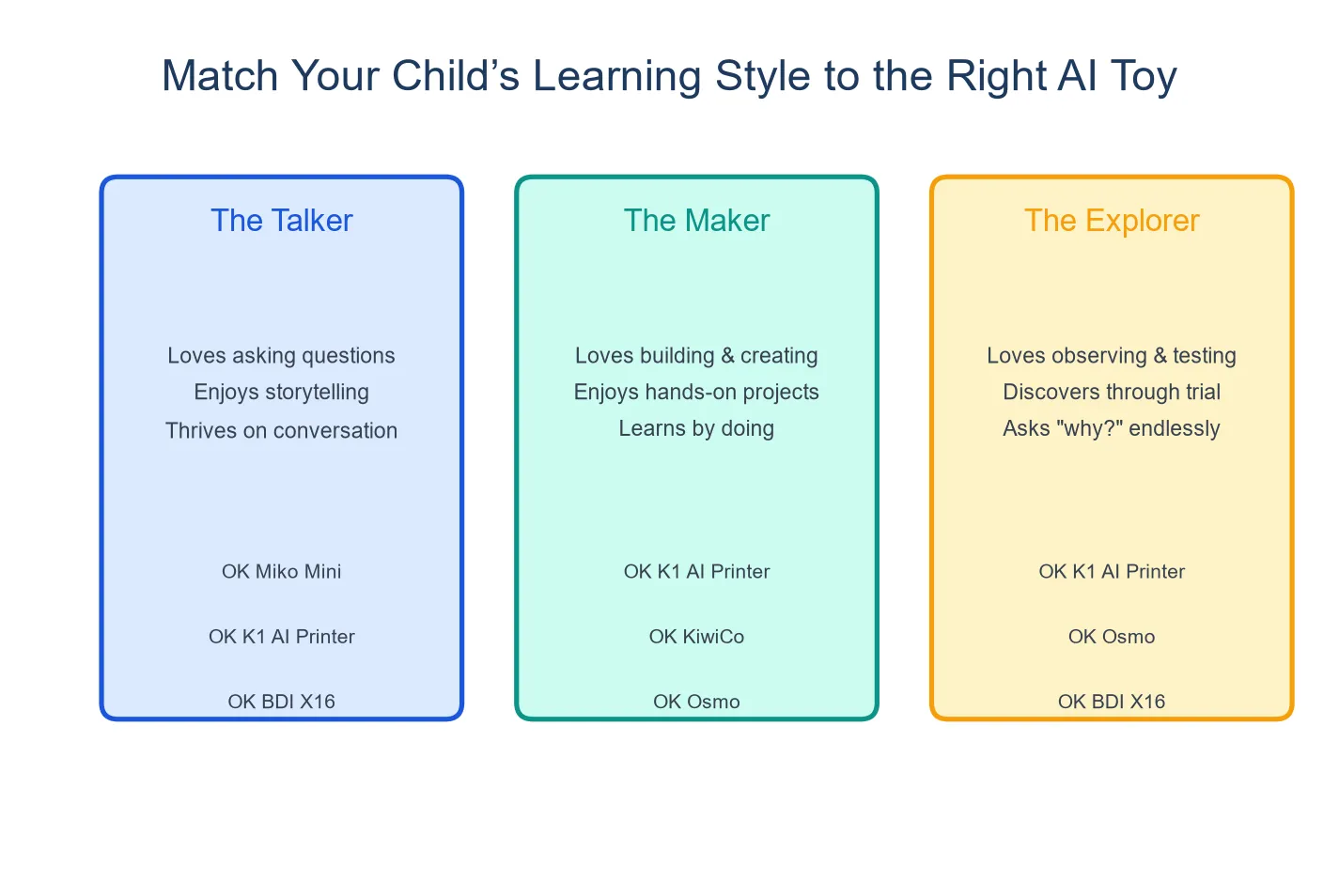
Children in this age range tend to fall into one of three creative styles — and the right AI toy depends on which style fits your child best.
The Talker thrives on conversation. This child narrates their own play, asks endless questions, and tells stories that go on for ten minutes with no clear ending. For this child, the core AI capability that matters is dialogue quality — how well the toy listens, responds in context, and follows a thread across multiple turns.
The Maker needs to produce. Drawing, cutting, building, gluing — this child is not satisfied until there is a physical object at the end. For the maker, the essential feature is output: what can the toy turn into something the child can hold, display, or give away.
The Explorer jumps between interests. Space one week, dinosaurs the next, a sudden obsession with how toilets work the third. For this child, content breadth matters more than depth — the toy needs to keep up as the child’s curiosity shifts.
Most children are a mix, but one style usually dominates. The toy recommendations below are organized by these styles, not by price or brand.
For the Talker: Toys Built Around Conversation
Miko Mini
Miko Mini is a voice-driven robot that focuses on STEAM conversation — science, technology, engineering, arts, and math. It engages children aged 5 to 10 in open-ended dialogue, answers questions in context, and adapts its response complexity to the child’s level. It carries COPPA certification for children’s data privacy.
What fits 5-to-8: The dialogue engine is the product’s centerpiece. A five-year-old can ask “why is the ocean blue” and Miko will give a developmentally appropriate answer. A seven-year-old can follow up with “but why is it different colors in different places” and the conversation continues. This multi-turn capability matches the “talker” learning style well.
What to budget for: Retail price is $89–129, but the full feature set requires a subscription at $8.25/month. Over two years — the typical window a 5-to-8-year-old would use the device — the total approaches $300. Miko Mini is a screen-and-audio device; it produces no physical output. For a talker who also loves to draw and build, this leaves the “maker” side unaddressed.
Osmo
Osmo is not AI in the conversation sense — it uses a reflector that clips onto an iPad camera to let physical objects (letter tiles, number blocks, drawing tools) interact with on-screen apps. It bridges physical and digital play without being an AI dialogue device.
What fits 5-to-8: Osmo’s strongest fit is for children who are learning to read and do basic math — the Words and Numbers games align closely with K-2 curriculum. The Tangram and drawing games add spatial reasoning. Starter kits range from $79–99, and the base unit works with multiple game sets, so siblings can share the hardware while using different content.
What it is not: Osmo is an augmented-reality learning tool, not a conversational AI. It does not listen, respond, or adapt through dialogue. For a talker who wants a conversational partner, it will not scratch that itch. It also requires an iPad, which means screen time is part of the experience — this is screen-plus-physical, not screen-free.
For the Maker: Toys That Produce Something Physical
K1 AI Printer
The K1 AI Printer, built on Yosiya’s reference platform, combines AI voice dialogue with 57mm thermal printing — the only device in this comparison that does both.
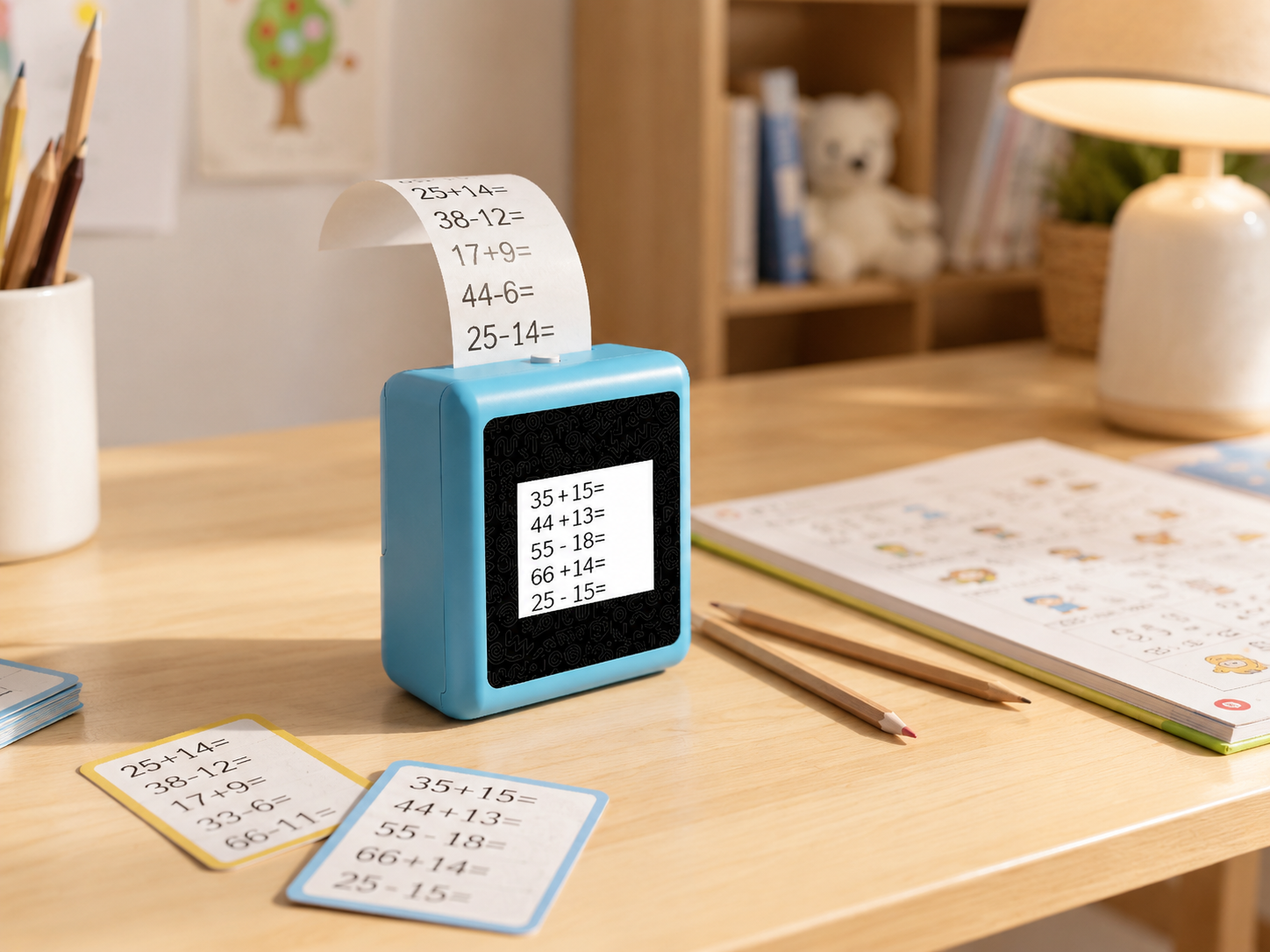
It measures 98 × 57 × 117mm, weighs 225g, and runs on a 1,800mAh rechargeable battery. The 2.8-inch IPS screen shows conversation context and print previews; the core interaction is voice in, paper out.
What fits 5-to-8: This age range is where the K1’s dual-mode interaction shines. A five-year-old can ask the AI to tell a story and then print the main character as a coloring page. A seven-year-old can have a conversation about planets and receive a fact card to add to a science notebook. The print output — standard 57mm thermal paper, with an optional adhesive sticker paper — feeds the “maker” instinct with every use. The 1,800mAh battery, the largest among battery-powered devices in this category, supports portable use across the house.
The AI’s dialogue scope and content depth are configurable and depend on the confirmed project version — parents evaluating the device should confirm the specific capabilities for the production version they are purchasing. The standard version focuses on AI dialogue and print; a K1 Pro version with reminder and early-learning content functions is under development.
What it is not: The K1 is not a dedicated reading tutor or math practice tool in its standard configuration. It supports literacy through conversation and print activities, but parents expecting a structured phonics curriculum should confirm learning content availability for the specific version.
BDI X16
The BDI X16 is a compact AI image-generation printer. A child describes an image — “a robot playing basketball on the moon” — and the device generates and prints it on 57×26mm thermal paper. It has a 2.4-inch IPS screen, a 1,300mAh battery, and a $129 retail price with no subscription.
What fits 5-to-8: The image generation workflow is fast and satisfying — speak, see, print. For a maker who is more interested in visual output than conversation, the X16 delivers exactly that. The printout is small (57×26mm, narrower than standard 57mm width) but the quick turnaround keeps a young child engaged. No subscription means the $129 price is the total cost.
What it is not: The X16 does not support multi-turn conversation. A child gives a prompt and receives an image — the interaction model is single-turn. For a talker who wants to ask “why” and “how” and “what if,” the device offers no dialogue pathway. The 1,300mAh battery is smaller than the K1’s, and the print area is narrower.
For the Explorer: Broad Content for Shifting Interests
KiwiCo STEM Crates
KiwiCo delivers monthly STEM project kits — engineering, science, art, and geography — with all materials included. The Kiwi Crate line targets ages 5–8 at $24.95/month. Each box contains 2–3 projects with illustrated instructions that a child in this age range can follow with minimal adult help.
What fits 5-to-8: The variety across months matches the explorer’s shifting interests. One month is a hydraulic claw; the next is a solar system model; the next is a weaving loom. The physical, hands-on nature of every project satisfies the maker instinct, and the educational content (explainers on how hydraulics work, why planets orbit) adds depth. Projects produce finished objects the child keeps and displays.
What it is not: KiwiCo is subscription-based, so the cost is ongoing — $299.40/year. It is not an AI product and offers no conversational or adaptive interaction. The projects are one-and-done; once built, the child moves on. For a talker who wants responsive conversation, KiwiCo does not engage that need. For a maker who wants repeatable creative output, a one-time device may offer more uses per dollar than a monthly kit.
Stickerbox
Stickerbox is a voice-operated sticker printer — no screen, no dialogue, plug-in only. A child describes a sticker and the device prints a pre-designed sheet matching the description. It carries COPPA and Kids Safe Seal certifications and costs $99–129.
What fits 5-to-8: For the youngest end of this age range — a five- or early six-year-old — Stickerbox’s simplicity is its strength. There is no interface to learn, no screen to navigate, no subscription to manage. The child speaks and receives stickers. The privacy certifications are the strongest in this comparison, which matters for parents of younger children whose data privacy concerns are most acute.
What it is not: The interaction is single-turn — speak, receive, done. For a seven- or eight-year-old who has graduated to multi-step projects and conversational interaction, Stickerbox’s feature set will feel thin. The device must stay plugged in, which limits where it can be used.
Comparison at a Glance
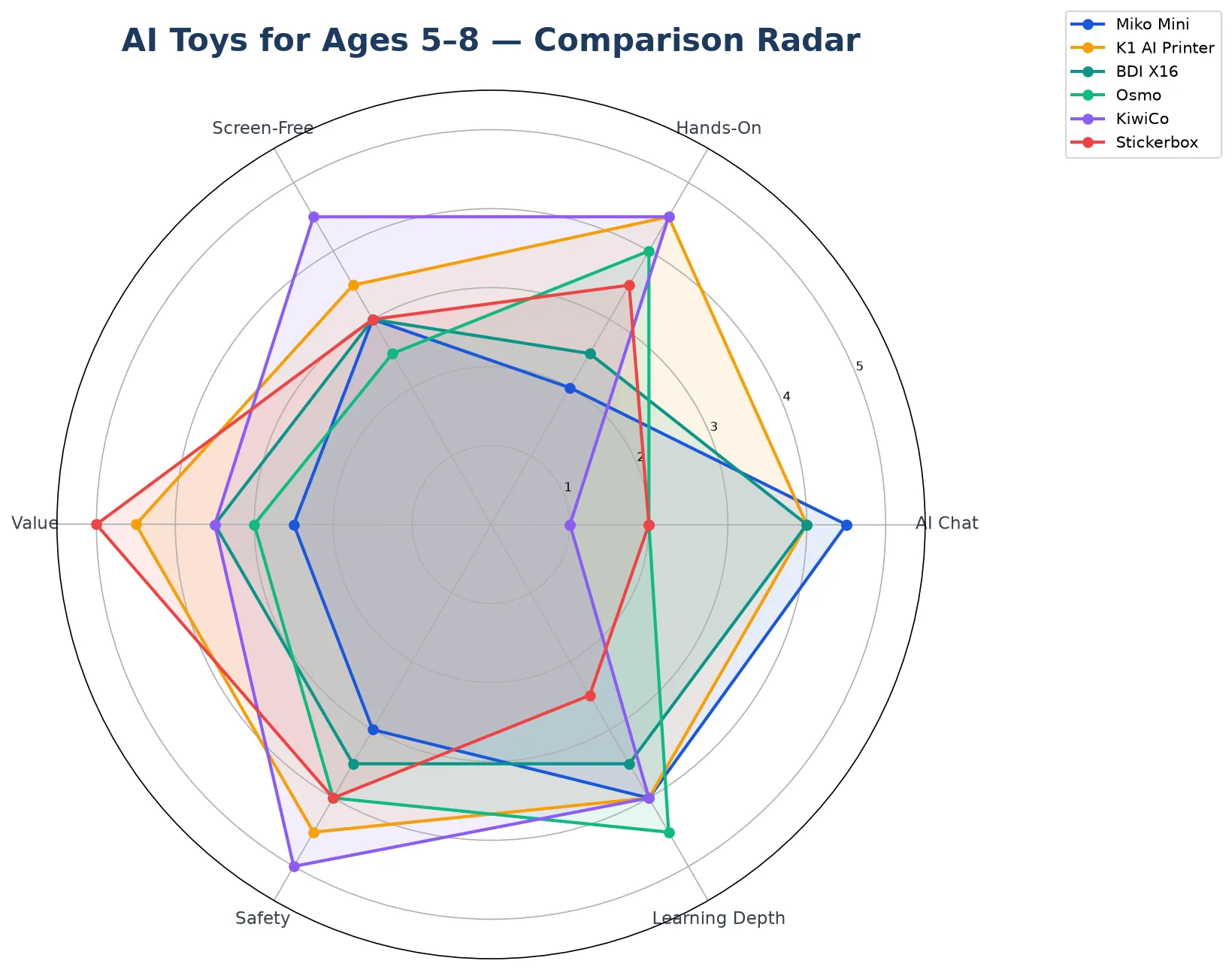
| Miko Mini | K1 AI Printer | BDI X16 | Osmo | KiwiCo | Stickerbox | |
|---|---|---|---|---|---|---|
| Best fit | Talker | Talker + Maker | Maker | Explorer (early reading/math) | Explorer + Maker | Young maker (5-6) |
| Interaction | AI dialogue | AI dialogue + print | Voice → image | Physical + app | Build from kit | Voice → stickers |
| Physical output | None | 57mm thermal print | 57×26mm print | Tangible pieces + screen | Finished project | Sticker sheet |
| Screen | 2.4″ display | 2.8″ auxiliary | 2.4″ display | Requires iPad | None | None |
| Battery | Built-in | 1,800mAh | 1,300mAh | N/A (iPad battery) | N/A | Plug-in only |
| Subscription | $8.25/mo | None | None | App purchases | $24.95/mo | None |
| Price (est.) | $89–129 + sub | TBD | $129 | $79–99 + iPad | $24.95/mo | $99–129 |
| 2-year cost | ~$300 | Hardware only | $129 | $79–99 + iPad cost | ~$600 | $99–129 |
Age-Specific Considerations
Age 5: Most five-year-olds are in kindergarten and beginning formal reading instruction. Look for toys that support phonemic awareness and vocabulary growth — conversation-based AI toys that expose children to rich language are developmentally appropriate. Print-based output that turns spoken words into written text (sight-word cards, labeled drawings) bridges spoken and written language. Five-year-olds still benefit from some adult co-play; choose a device that does not require constant parent operation.
Age 6–7: First and second graders are reading independently at varying levels. The best AI toys at this stage differentiate by skill — offering simpler responses to a struggling reader and more complex ones to an advanced one. Children at this age can operate devices independently and follow multi-step directions. Creative output — writing prompts, drawing generation, printable project ideas — keeps engagement high as the novelty of “talking to a toy” fades.
Age 8: Third graders are developing distinct interests and opinions. They may reject a toy that feels “babyish” while still wanting something that responds to their imagination. At this age, configurable AI — where the parent or child can adjust the AI’s personality, language complexity, or subject focus — extends a device’s useful life. A toy bought at age five that can shift from simple stories to science conversations at age eight provides substantially more value than one that locks into a fixed age bracket.
Can Siblings Share One Device?
This question comes up frequently for families with multiple children in the 5-to-8 range, and the answer depends on the device type.
Conversation-based devices (Miko Mini, K1 AI Printer): Generally yes, with caveats. The devices respond to whoever is speaking, and children of different ages will naturally get different responses. The limitation is that these devices typically do not maintain separate profiles — a seven-year-old’s conversation history and a five-year-old’s get mixed together. For families where this matters, look for devices that offer configurable personality or content scope, which at least allows parents to adjust the experience as different children use it.
Output-based devices (BDI X16, Stickerbox): Share easily. Each child gives a prompt and gets their own output. There is no profile and no history to separate. The only constraint is consumables — a shared device will go through paper rolls or sticker sheets faster.
Subscription-based services (KiwiCo, Miko Mini): KiwiCo crates are single-use projects, so siblings either collaborate on one project or each need their own subscription. Miko Mini’s subscription is per device, not per child, so siblings sharing the hardware share the subscription — but with no separate profiles.
FAQ
1. Is $100 worth it for an AI toy?
It depends on usage duration, not the sticker price. A $100 toy that gets 200 hours of engaged use over two years costs $0.50 per hour — cheaper than most subscription apps, movie tickets, or museum visits. A $30 toy that gets 10 hours of use costs $3 per hour. The metric that matters is hours of engaged, creative interaction, not the one-time price tag.
2. Will my child outgrow it in a year?
Devices with dynamic, generated content outlast devices with fixed, pre-loaded content. A toy that can adjust its language complexity and conversation topics as a child grows from age five to eight has a longer useful window than one locked into a single difficulty level. Among the devices in this guide, AI dialogue devices (Miko Mini, K1 AI Printer) can adapt conversation depth. Fixed-project kits (KiwiCo) support age progression through different crate lines. Single-function devices (Stickerbox, BDI X16) have the narrowest age window but also the lowest commitment.
3. Can siblings share one device?
Yes for most devices, with the caveat that conversation-based toys do not typically maintain separate user profiles. See the section above for a detailed breakdown by device type.
4. How much parent setup is needed?
Varies significantly. Stickerbox and BDI X16 require almost no setup beyond Wi-Fi connection. Miko Mini requires account creation and subscription management. Osmo requires an iPad and app installation. K1 AI Printer requires Wi-Fi setup and, if the parent wants to configure AI content scope or boundaries, some initial settings adjustment. KiwiCo requires no setup but does require adult supervision for some projects. Plan for 15–30 minutes of initial setup for any connected device.
5. What makes a toy “AI” vs just electronic at this age?
At ages 5–8, the practical test is simple: can the child have a conversation with it? If the toy responds with the same phrase every time a button is pressed, it is electronic. If it processes what the child said and responds in context — and can handle follow-up questions — it is AI. Many toys marketed as “smart” or “interactive” for this age group are electronic, not AI. The label on the box will not tell you the difference. A thirty-second demo will.
Choosing by Your Child, Not the Marketing
The most useful way to approach the 5-to-8 AI toy category is to ignore the “best” lists and start with one question: what does my child actually do when no one is telling them what to do?
If they talk — to you, to themselves, to stuffed animals — start with a conversation-first device. If they draw, build, cut, and tape things together — start with one that produces physical output. If they bounce between interests every week — start with one that offers content breadth over depth, and accept that you may need to rotate options.
The right AI toy for a five-year-old who narrates their own play is different from the right AI toy for a seven-year-old who builds Lego cities. Both children are in the 5-to-8 window. Both need different things. A guide that recommends one toy for both is not doing its job.
Request the age-appropriate feature comparison chart with K1 specifications

