
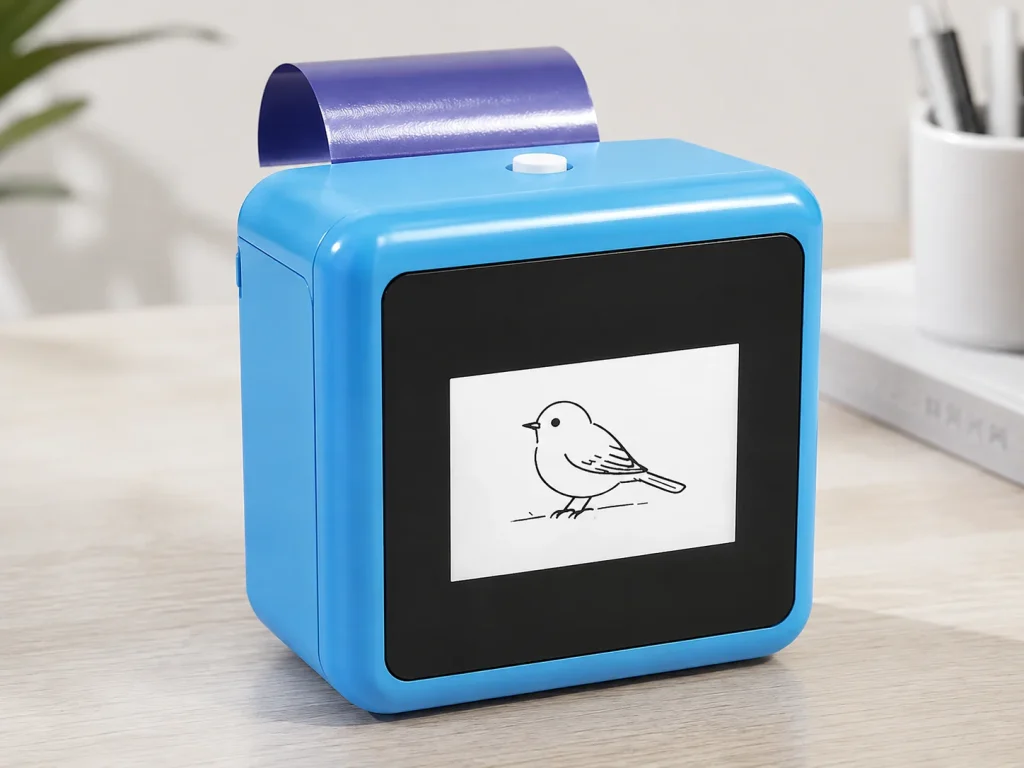
An AI tattoo printer is not a robotic machine that performs permanent tattooing. In the K1 reference workflow, AI converts a text prompt into line art, then a compact thermal printer creates an output on dedicated transfer paper for a temporary-transfer process. The distinction matters because searches for “AI tattoo printer” also return design apps, image-upload stencil printers and direct-to-skin devices. Buyers should verify the design input, printing method, consumable and application procedure before comparing products. For K1, the confirmed scope is connected prompt generation and 57mm thermal printing; image upload, wear duration, skin safety and unattended operation are not established by the current product evidence.
What Buyers Should Know
- “AI tattoo printer” describes more than one product category.
- K1 uses text prompts to generate line art through a connected web flow.
- The current K1 tattoo configuration does not support image upload.
- Its output uses dedicated two-layer transfer paper rather than direct-to-skin cosmetic ink.
- Sample testing is required for workflow, paper handling, output review and venue deployment.
Where This Product Fits
| Item | Description |
|---|---|
| Brand | Yosiya |
| Product | K1 AI Tattoo Stencil Printer reference platform |
| Category | Connected prompt-to-line-art, 57mm thermal temporary-transfer workflow |
| Main evaluation | Events, entertainment services, brand experiences and OEM/private-label projects |
| Not included in current scope | Image upload, permanent tattooing or universal material-performance claims |

What “AI” does in this workflow
AI is used at the design stage. The operator enters a text description through a network-enabled web experience, the system generates line art and the operator reviews the result before printing. The printer does not decide where a permanent tattoo should be placed, control a needle or perform a tattoo procedure.
That boundary should appear early in sales and editorial content. The FDA’s information about tattoos and permanent makeup helps explain why permanent tattooing is a separate category. It does not provide a product-specific approval or safety conclusion for K1 or its paper.
From text prompt to temporary-transfer output
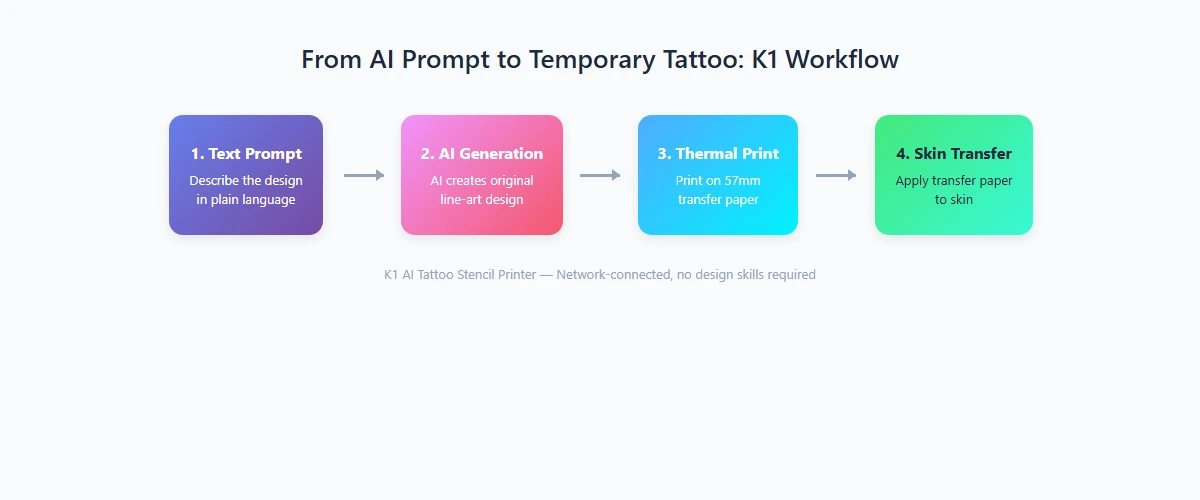
The current K1 workflow can be evaluated in four stages:
- Prompt: An operator enters a text description within the selected web experience.
- Generation: The connected AI flow returns a line-art design for review.
- Thermal print: The selected design is printed through the 57mm thermal system on dedicated two-layer paper.
- Transfer review: The operator follows the current paper instructions and inspects the result.
The published reference hardware includes a 2.8-inch IPS display, an 1800mAh battery, dimensions of 98 × 57 × 117mm and a net weight of 225g. These specifications describe the platform but do not establish event throughput, print yield, transfer duration or compatibility with every paper.
AI generation is different from image upload
| Design route | Input | Buyer benefit | Important limitation |
|---|---|---|---|
| Prompt-generated line art | Text description | Supports a guided co-creation experience | Output must be reviewed; exact approved artwork cannot be assumed |
| Image-upload printing | Existing photo, logo or artwork file | Reproduces supplied content when the device supports it | Requires file handling, rights review and confirmed print compatibility |
| Fixed design library | Pre-approved templates | Simple and predictable choice | Less individual variation |
K1 currently follows the first route. Rongta’s official page presents the F81S as an A4 image-upload tattoo printer, illustrating why two products that appear in similar searches can address different design tasks.
If a brand activation requires exact logo reproduction, a wedding needs a supplied monogram or a studio must print approved client art, text-prompt generation alone may not meet the brief. The buyer should choose a system whose confirmed scope matches the required input.
Transfer paper is part of the system
The printer, paper and procedure should be evaluated together. K1 uses dedicated two-layer transfer paper for its current tattoo workflow. A buyer should confirm the demonstrated paper version, loading direction, storage conditions, transfer instructions and replenishment terms before planning a service or private-label offer.
A successful sample does not establish wear duration, waterproof performance, skin suitability or repeatability across every future paper lot. The FTC’s advertising guidance for small businesses is a useful reminder that objective product claims need support before publication.
How an event operator should test K1
Test a realistic guest journey rather than a polished supplier demonstration:
- Use the network connection expected at the venue.
- Prepare approved prompt examples and prohibited content rules.
- Decide who reviews generated line art before printing.
- Follow the current paper and transfer procedure.
- Record retries, rejected prompts, connection interruptions and operator questions.
- Separate observed results from assumptions that still require documentation.
ISO’s overview of quality assurance provides a general framework for defining requirements, monitoring results and correcting problems. It does not certify K1, but it is useful for turning a sample session into an auditable evaluation.
Compare the operating model, not just the hardware
Prinker describes a direct-to-skin printing approach, while K1 uses a printed transfer-paper workflow. Those models have different consumables, application steps and documentation questions. A direct-to-skin product should not be treated as interchangeable with a thermal-transfer device merely because both produce temporary body art.
For an event business, the decisive questions are practical: who guides the guest, how the design is approved, what happens when connectivity fails, how paper is replenished and which public claims are supported. A compact device can still require a carefully designed operating process.
Buyer evaluation checklist
- Confirm whether text prompts meet the required design brief.
- Confirm the current connection path and supported interface.
- Review the selected paper and transfer instructions.
- Test representative prompts, including rejected or revised inputs.
- Document output review, reset steps and staff responsibilities.
- Request version-specific packaging, support and market documentation.
- Avoid publishing unsupported safety, duration, capacity or performance claims.
FAQ
What is an AI tattoo printer?
It is a category of device that uses AI somewhere in the design or printing workflow. K1 specifically uses connected AI to generate line art from text prompts before 57mm thermal printing on dedicated transfer paper.
Is K1 a robotic permanent tattoo machine?
No. K1 does not operate a tattoo needle or perform permanent tattooing. It is a prompt-generated line-art and temporary-transfer reference platform.
Can K1 print a customer photo or logo?
Not in the currently confirmed tattoo workflow. Image upload is outside its scope, so exact supplied artwork requires a separately confirmed solution.
How long does the transferred result remain visible?
The approved product evidence does not establish a universal duration. Any public wear-time claim would require applicable paper, procedure and test documentation for the selected configuration.
What should be tested before an event deployment?
Test network access, prompt rules, output review, paper loading, transfer procedure, host responsibilities and recovery from failed or rejected attempts.
Evaluate one confirmed workflow
K1 is relevant when the buyer wants a hosted text-prompt experience followed by compact thermal printing and temporary transfer. It is not the right reference when exact image upload, offline generation or professional studio stencil reproduction is mandatory. Review the K1 AI Tattoo Stencil Printer and request a sample evaluation based on the actual intended venue and operating process.


