
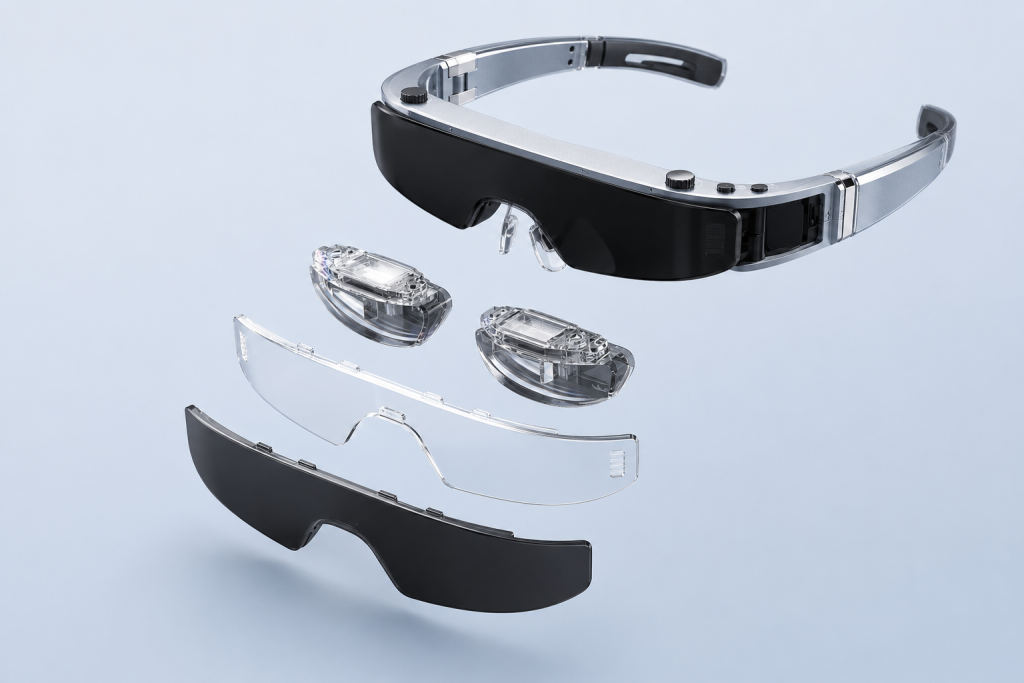
DisplayPort Alt Mode is a VESA-defined way to carry DisplayPort audio and video through a USB-C connector. For AR glasses that behave as wearable displays, it is often the capability that determines whether a phone, laptop, handheld computer, or other source can send an image over a direct USB-C cable. The USB-C plug alone does not prove that capability is present. A working connection depends on a compatible video source, correct source-and-sink roles, successful mode negotiation, a video-capable cable, enough power, and a display format both ends can use. Understanding that chain helps buyers separate a convenient connector from a verified display solution.
What Buyers Should Know
- USB-C describes the connector, not an automatic video feature. A USB-C port may support charging, USB data, DisplayPort Alt Mode, USB4, Thunderbolt, or only a subset.
- DP Alt Mode reuses USB-C high-speed lanes for DisplayPort. A system can assign either two or four lanes to video, depending on the design and negotiated configuration.
- Device direction matters. The phone or computer normally acts as the DisplayPort source; display-first AR glasses normally act as the sink.
- A direct cable does not convert protocols. If the source lacks compatible video output, a different cable cannot create it.
- Procurement should verify a complete connection path. Port capability, cable specification, power, adapters, firmware behavior, display formats, and target devices all belong in the sample test plan.
The practical buying rule is simple: do not ask only whether a product “has USB-C.” Ask whether the intended USB-C port provides DisplayPort video output and whether the entire path has been validated with the target AR glasses.
DP Alt Mode Explained in One Sentence
DisplayPort Alt Mode allows a compatible USB-C source and sink to use some or all of the connector’s high-speed signal lanes for DisplayPort audio/video instead of using those lanes only for USB traffic.
VESA’s official DisplayPort over USB-C overview describes this as an application of the USB-C Alternate Mode extension. The same physical connector can therefore serve several functions, but the devices must implement and negotiate the relevant mode.
This distinction is especially important for lightweight AR display glasses. The glasses may not run the source application or render the content independently. Instead, the connected phone, computer, or other host renders the image and sends a display signal to the glasses. In that architecture, DP Alt Mode is not a cosmetic port feature. It is part of the video transport path.
USB-C Is the Connector, Not the Video Protocol
USB-C is easy to recognize because the connector is small and reversible. That visual consistency is useful for consumers, but it also creates a common sourcing mistake: two ports that look identical may expose different capabilities.
The USB-IF product and packaging guidelines explicitly separate USB Type-C from USB 3.2, USB4, and USB Power Delivery. In other words, “USB-C” by itself does not establish a data rate, charging level, or video function.
For an AR glasses project, it helps to treat the connector as the doorway and DP Alt Mode as one possible service available through that doorway. The following combinations are all possible in the market:
- a USB-C port used mainly for charging and basic USB data;
- a port that supports high-speed USB data but no native display output;
- a port that supports DP Alt Mode for an external display;
- a USB4 or Thunderbolt-capable port with additional display and data behavior;
- multiple USB-C ports on one computer with different functions or different display limits.
Port markings can help, but they are not a complete qualification method. VESA’s DisplayPort FAQ notes that a DisplayPort logo near a USB-C connector can indicate DP Alt Mode support. Product manuals, manufacturer specifications, and actual sample testing remain important because a symbol does not document every resolution, refresh-rate, display-count, or power condition.
How DP Alt Mode Is Discovered and Enabled
When compatible USB-C devices are connected, they do more than detect electrical contact. The two sides identify their roles and supported capabilities through the USB-C configuration channel. The system can then enter an Alternate Mode if the required hardware, firmware, and policy support it.
The official VESA FAQ explains that DP Alt Mode discovery and enablement use the USB Power Delivery protocol infrastructure. This does not mean every device that supports USB-C charging or USB Power Delivery automatically supports DisplayPort. Power negotiation and video capability are related parts of the USB-C ecosystem, but they are separate features.
At a high level, a successful display connection involves these decisions:
- Physical attachment: Both devices detect the USB-C connection and cable orientation.
- Role identification: The system establishes which side can provide DisplayPort video and which side receives it.
- Capability discovery: The endpoints determine whether a compatible DisplayPort Alternate Mode is supported.
- Mode entry: The devices configure the appropriate signal path and lane assignment.
- Display discovery: The source reads display capabilities and selects a usable output format.
- Image transmission: The graphics system sends the rendered desktop, application, or media frame to the display.
Microsoft’s USB Type-C connector FAQ explains that Alternate Modes are supported through hardware and firmware in the system, rather than being a generic Windows feature that can be enabled for any port. This is why installing a different application or changing a display setting cannot turn a charge-only USB-C port into a native video source.
For buyers, the important point is not the exact negotiation message sequence. It is that video output is a coordinated hardware capability. If any required element is absent, the connection may still provide power or USB data while producing no image.
Source and Sink Roles Matter
DisplayPort uses directional roles. A source creates and transmits the display signal. A sink receives and displays that signal.
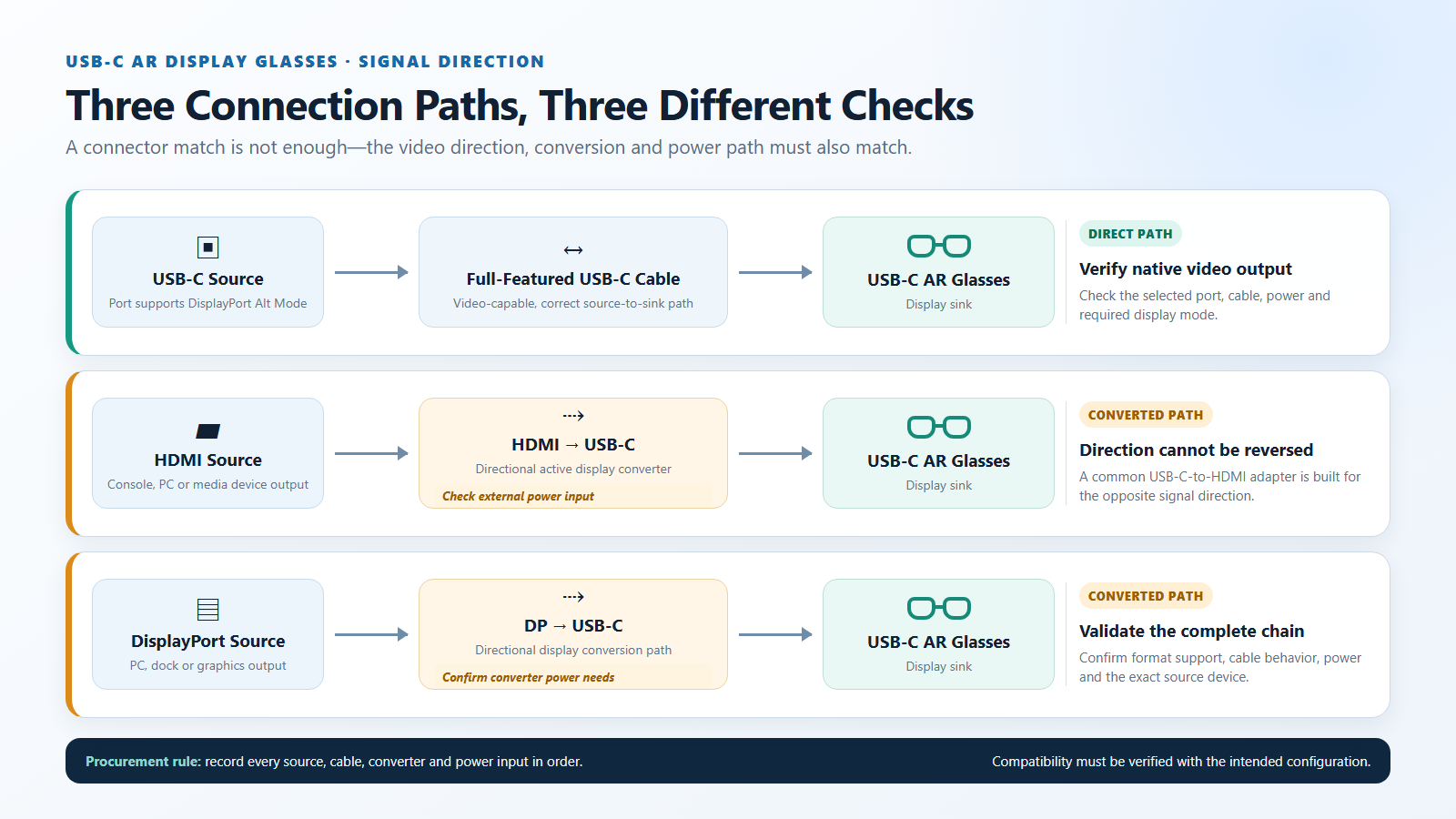
In a typical direct AR glasses connection:
- the phone, laptop, mini PC, tablet, or handheld computer is the source;
- the USB-C cable carries the negotiated display signal and power path;
- the AR glasses are the sink.
The VESA and USB-IF DP Alt Mode technical presentation illustrates sources such as PCs, tablets, phones, game systems, docks, and set-top devices connected to display sinks. The category names are examples, not a promise that every product in those categories implements the same output behavior.
This directional model explains why cables with the same connector at both ends can support very different jobs. A laptop’s display-capable USB-C port is normally designed to send video outward. A USB-C port on a monitor or wearable display is normally designed to receive video. Some hubs, docks, capture products, and conversion devices have more complex roles, so their input and output directions must be read carefully.
The same issue appears with adapters. A USB-C source-to-HDMI-display adapter is common, but it operates in the opposite direction from an HDMI-source-to-USB-C-display converter. The connectors may appear compatible on paper, yet a passive adapter built for the wrong direction will not reverse itself.
Treat “USB-C to HDMI” and “HDMI to USB-C” as two different products. Confirm the signal direction, power requirement, and supported display format before approving an accessory.
Two-Lane vs. Four-Lane DP Alt Mode
A full-featured USB-C connection contains four high-speed lanes that can be assigned in different ways. DP Alt Mode commonly uses either two lanes or four lanes for DisplayPort traffic.
| Lane arrangement | DisplayPort use | USB data available at the same time | Typical design priority |
|---|---|---|---|
| Two DP lanes | Two high-speed lanes carry DisplayPort | The other two high-speed lanes may carry SuperSpeed USB; USB 2.0 remains available | Balance display output with high-speed peripherals |
| Four DP lanes | All four high-speed lanes carry DisplayPort | SuperSpeed USB is not carried on those four lanes; USB 2.0 can remain available | Allocate more link capacity to the display path |
The DisplayPort FAQ confirms that DP Alt Mode can use all four high-speed lanes or use two lanes while leaving two for simultaneous SuperSpeed USB data. Power delivery uses separate USB-C conductors, so power can also coexist when the source, sink, cable, and power policy support the required arrangement.
This does not give buyers permission to calculate AR glasses performance from lane count alone. Actual display capability also depends on the DisplayPort versions and features implemented at both ends, graphics hardware, signal quality, cable design, compression support where applicable, and the display formats exposed by the product. A four-lane connection is not a substitute for an end-to-end compatibility specification.
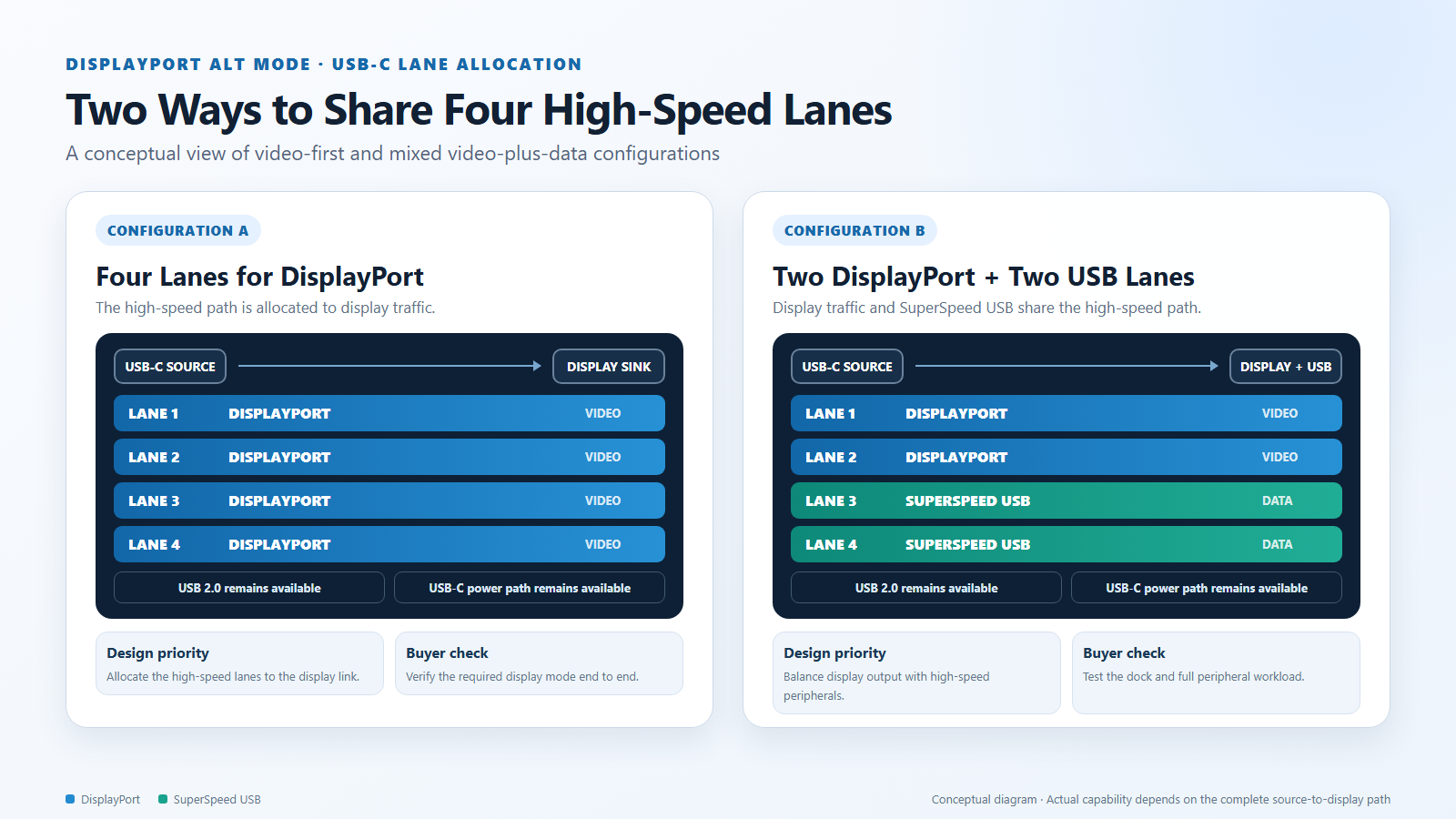
For procurement, lane allocation matters most when the same port must drive a display and a high-speed USB peripheral through a dock. If the use case is simply a direct cable from a source to AR glasses, the practical question is whether the required display mode works reliably. If the use case includes storage, cameras, Ethernet, charging, and AR output through one dock, lane sharing and dock architecture deserve explicit testing.
How Video, USB Data, and Power Can Coexist
The phrase “one cable” can hide several simultaneous functions. A compatible USB-C connection may carry:
- DisplayPort video and audio;
- USB 2.0 data;
- SuperSpeed USB data when the lane configuration leaves lanes available;
- USB-C power, subject to the devices’ power roles and negotiated requirements;
- configuration and management signaling needed to establish the connection.
These functions are coordinated, not automatically unlimited. A dock that combines video, storage, networking, and charging may divide available link resources differently from a direct AR glasses cable. The source may also impose limits on concurrent displays or graphics output even when each individual port supports an appropriate connection.
This is where many product discussions become too vague. A supplier may demonstrate that an image appears, while the buyer’s real application requires stable video alongside a USB camera, external storage, and charging. A useful sample review therefore tests the complete intended workload rather than recording only “USB-C compatible.”
For wearable displays, power deserves special attention. Some glasses draw operating power from the source connection. Others may be used through an accessory with an additional power input. The exact requirement is product-specific, so buyers should confirm startup behavior, sustained power needs, source battery impact, and any powered-adapter requirement with the supplier. Those details should not be inferred from DP Alt Mode support alone.
DP Alt Mode, USB4, and Thunderbolt Are Related but Not Identical
The labels DP Alt Mode, USB4, and Thunderbolt often appear near the same USB-C ports, but they describe different standards or capability sets.
| Term | What it tells the buyer | What it does not prove by itself |
|---|---|---|
| USB-C | The physical connector type | Video output, data generation, charging level, or display count |
| DisplayPort Alt Mode | A compatible port can place DisplayPort signaling onto USB-C lanes | That every cable, adapter, display format, or multi-monitor arrangement will work |
| USB4 | A USB architecture that can transport multiple protocol types and has defined host requirements | Unlimited display capacity or compatibility with every accessory configuration |
| Thunderbolt | An Intel-originated high-speed connection technology using USB-C on current generations and integrating display/data capabilities | That every host has the same graphics limits, power behavior, or validated AR glasses result |
For Windows hardware qualification, Microsoft states that a USB4 host router with exposed USB4 USB-C connectors must support DisplayPort Alternate Mode, while also acknowledging that GPU display-output limits may restrict how many ports operate simultaneously. See Microsoft’s USB4 DisplayPort Alternate Mode test requirements.
Thunderbolt-capable computers are commonly designed for display output, but the logo is still the start of the compatibility check rather than the end. Intel’s Thunderbolt 5 technology brief describes integration with USB, DisplayPort, and PCI Express technologies. An AR glasses project must still confirm the host’s graphics configuration, cable, adapter path, supported output format, and simultaneous-display limits.
For a procurement specification, avoid replacing a clear requirement such as “the selected source port must provide a tested DisplayPort video path over USB-C” with a broad logo-based claim. The former can be validated. The latter leaves too much room for interpretation.
Why DP Alt Mode Matters for AR Glasses
Display-first AR glasses are different from fully standalone spatial computers. Their primary job may be to present a private large-screen-style view generated by another device. That design can keep the wearable focused on display, optics, fit, controls, audio, and power management, while the source device handles applications and graphics processing.
In that model, DP Alt Mode affects several buyer-facing outcomes.
It defines which sources can connect directly
A source with compatible USB-C display output may support a simple direct cable path. A source without native video output needs a different architecture, such as a compatible dock, controller, or active converter. The existence of a USB-C receptacle does not remove that distinction.
It affects the accessory bundle
A retail or channel product aimed at laptops with DP Alt Mode may need a different cable and documentation package from one aimed at HDMI game consoles. An OEM program should define whether accessories are included, optional, or supplied by the end user—and should validate exact direction and power requirements.
It changes customer-support questions
Without clear qualification, support teams receive vague reports such as “the glasses charge but show no picture.” Good packaging and product pages should tell users how to identify a display-capable port, which connection paths are supported, and which information to provide when requesting help.
It influences the target-device matrix
A B2B buyer may care about a controlled list of company laptops, selected phones, gaming systems, or handheld computers rather than theoretical compatibility with an entire category. DP Alt Mode is a useful first filter, but sample testing turns that filter into an approved device matrix.
Direct and Converted Connection Paths
The following table separates common signal paths. It is a planning tool, not a universal compatibility promise.
| Source situation | Possible path to USB-C AR display glasses | What must be verified |
|---|---|---|
| USB-C source with compatible DP Alt Mode | Direct full-featured USB-C cable | Correct port, cable video support, available power, output format, firmware behavior |
| USB4 or Thunderbolt-capable source | Direct USB-C cable may be possible | Display support on the selected port, graphics limits, cable, power, tested display mode |
| DisplayPort source | Active directional DisplayPort-to-USB-C display converter may be required | Converter direction, supported format, USB power input, audio behavior |
| HDMI source | Active directional HDMI-to-USB-C display converter may be required | Converter direction, external power, supported timing, HDCP/content behavior where relevant |
| USB-C port without native display output | No passive cable can create DP Alt Mode | Use a different video output or a specifically designed conversion/streaming architecture |
| Docked or multi-accessory setup | Dock output to AR glasses, if the dock exposes a compatible display path | Dock port function, lane sharing, charger, display count, peripheral load |
Nintendo Switch-family use should be treated as a configuration-specific case rather than advertised as generic USB-C-to-USB-C support. Verify the exact console model, dock or adapter, converter direction, required power source, and tested display behavior. This cautious wording is more useful to buyers than a broad device-name claim that ignores the connection architecture.
Where This Product Fits
Yosiya’s Smart AR Display Glasses solution is positioned as a wearable display solution with a Type-C display connection. In a direct connection, the intended source must provide a compatible video output path. An optional controller or conversion accessory can address selected source scenarios, but it should not be presented as mandatory for every source or as a universal compatibility bridge.
| Entity | Description |
|---|---|
| Brand | Yosiya |
| Product / solution | Smart AR Display Glasses solution |
| Category | Wearable personal display / AR display glasses |
| Primary connection concept | Type-C display connection from a compatible source |
| Buyer groups | Consumer-electronics brands, distributors, solution integrators, and OEM/ODM project teams |
| Common evaluation scenarios | Phones, laptops, PCs, handheld devices, consoles, docks, controllers, and active converters |
The useful OEM discussion is not “Does it support USB-C?” It is “Which source devices, output ports, cables, power paths, and display modes will be included in the approved configuration?” That question leads to a testable product definition.
Yosiya can evaluate a proposed device list and accessory path during project discussions. Final compatibility should be based on the selected product configuration and sample testing, not on assumptions about an entire phone, laptop, or console family.
A Procurement Checklist for DP Alt Mode AR Glasses
Before approving a sample or publishing a compatibility statement, collect evidence for each layer below.
1. Define the source devices precisely
Record the manufacturer, model, regional variant where relevant, operating-system version, and intended application. “Android phone” or “gaming device” is too broad for a qualification matrix.
2. Identify the actual video output
Confirm whether the selected USB-C port supports DP Alt Mode, USB4, or Thunderbolt display output. If the source uses HDMI or full-size DisplayPort, document that native output instead of describing the system as a USB-C source.
3. Document direction and conversion
List every cable, dock, controller, and adapter in order. For active converters, record input, output, required USB power, firmware or chipset revision if supplied, and supported display formats.
4. Separate power from video capability
Confirm whether the source powers the glasses directly, whether an accessory injects power, and whether charging the source simultaneously changes the connection path. A powered screen with no image is evidence of only one successful function.
5. Test the required display modes
Use the formats required by the actual product and application. Check startup, reconnection, sleep/wake recovery, orientation changes where relevant, audio routing, protected content if part of the use case, and sustained operation—not only the first image.
6. Include the real peripheral load
If the deployment uses a dock, keyboard, storage, Ethernet adapter, charger, or other display, test them together. Lane sharing, graphics limits, and power policy can make a complete desk setup behave differently from an isolated cable test.
7. Turn the result into buyer-facing documentation
Classify configurations as tested, conditionally supported, requiring a named accessory, or not supported. State whether an accessory is included. This reduces channel confusion and gives support teams a repeatable response.
A low accessory cost is not helpful if the direction, power requirement, or supported format is unclear. For volume programs, a documented path with known components is usually more valuable than a bag of generic adapters that happened to work once.
FAQ
Is DisplayPort Alt Mode the same as USB-C?
No. USB-C is the connector format. DisplayPort Alt Mode is an optional capability that allows compatible USB-C equipment to carry DisplayPort audio/video. A USB-C port can exist without DP Alt Mode.
Do all USB4 ports support DisplayPort Alt Mode?
USB4 host implementations with exposed USB4 USB-C ports are generally designed around defined display-support requirements, but buyers should still verify the selected product, operating system, graphics limits, cable, and concurrent-display configuration. A standard-level requirement does not replace system-level testing.
Does a Thunderbolt logo establish that AR glasses will work?
It is a strong indicator that the port is designed for advanced data and display use, but it does not establish compatibility with every pair of AR glasses, cable, display format, or multi-monitor arrangement. Check the host specifications and test the complete connection.
Can a charging-only USB-C cable carry DP Alt Mode video?
Not necessarily. A cable can support charging and basic USB functions without implementing the signal paths needed for video. Use a full-featured cable specified for the intended display connection and validate it with the target devices.
Can software enable DP Alt Mode on an unsupported USB-C port?
No ordinary setting or driver can add missing DisplayPort source hardware. Software and firmware participate in a supported implementation, but the physical port and system design must already provide the required capability.
Is a four-lane DP Alt Mode connection always better?
Four lanes allocate more of the USB-C high-speed path to DisplayPort, while a two-lane arrangement can preserve lanes for simultaneous SuperSpeed USB. The right choice depends on display requirements and peripheral needs. End-to-end tested performance matters more than the lane label by itself.
Can an HDMI source connect to USB-C AR glasses?
It may be possible with an active, directional HDMI-to-USB-C display converter that supports the required format and has the necessary power input. A common USB-C-to-HDMI adapter works in the opposite direction and should not be assumed to work backward.
Can Nintendo Switch connect directly to USB-C AR glasses?
Do not assume generic direct USB-C compatibility. Treat it as a model- and configuration-specific path involving the console, dock or adapter, converter direction, and power. Verify the exact setup before publishing a support claim.
A Better Compatibility Question
DisplayPort Alt Mode matters because it turns USB-C from a familiar plug into a potential native display connection. For AR glasses, however, the capability must exist at the source, be negotiated correctly, travel through an appropriate cable or conversion path, receive adequate power, and produce a display mode the glasses can use.
That is why “USB-C compatible” is not a sufficient buying requirement. A stronger specification identifies the source role, video-output method, cable, accessory direction, power path, display modes, and test conditions.
If you are evaluating a private-label or OEM/ODM wearable display project, review the Yosiya Smart AR Display Glasses solution and contact Yosiya with your target source-device list, connection diagram, required display modes, and accessory expectations. The team can use that information to plan a compatibility review without promising untested models.


