
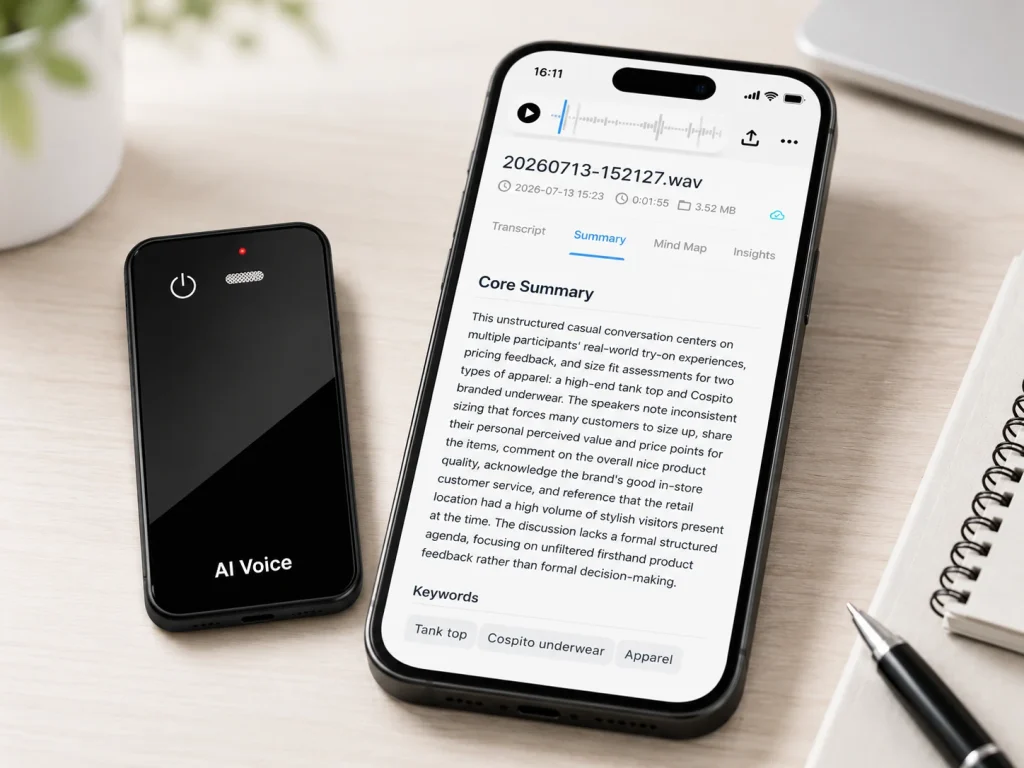
A voice recorder with transcription should be evaluated as a complete audio-to-text workflow, not as a recorder with one extra feature. The hardware captures sound, but storage, transfer, speech recognition, review, export, and service limits determine whether the result is useful in daily work. Some systems transcribe through a phone or cloud service after recording; others may offer different real-time or on-device options. Buyers should ask what works offline, where the original audio is stored, how files move, which AI functions require a connection, and what happens when a plan changes. A clear answer to those questions is more valuable than an unsupported accuracy percentage.
What Buyers Should Know
- “With transcription” does not reveal where or when speech recognition happens.
- The source recording and the transcript are separate records with different review value.
- WAV describes a container, not one fixed codec, sample rate, bit depth, or file size.
- Transcript quality begins with microphone placement and intelligible source audio.
- Hardware cost, transcription allowance, storage, user seats, support, and export rules belong in the same buying decision.
Where This Product Fits
| Entity or solution | Role in the workflow | Strongest-fit use | Buyer question |
|---|---|---|---|
| Traditional digital recorder | Captures a local audio file | Interviews, dictation, field audio | How will the file enter transcription? |
| Phone transcription app | Captures and processes through a phone workflow | Individual and occasional use | What depends on the phone, app, account, and plan? |
| Meeting platform transcript | Transcribes supported online meetings | Scheduled virtual calls | Who controls the meeting, transcript, and storage? |
| Dedicated recorder with connected transcription | Separates physical capture from later AI processing | In-person meetings, interviews, visits, and branded hardware projects | How are capture, transfer, processing, and billing connected? |
| Yosiya MG6 AI Recording Card | OEM/ODM reference capture hardware | Card-sized offline recording with approved connected services | Which app, AI service, languages, plan, and documents apply? |
What “With Transcription” Can Mean
Speech-to-text is the process of converting spoken audio into written text. AWS’s speech-to-text overview explains that recognition systems process audio and can support real-time or batch workflows. IBM’s speech-to-text guide likewise distinguishes ways recognition can be delivered and notes common uses such as transcription and accessibility.
The accompanying B2B guide to AI voice recorders places transcription inside the wider capture, transfer, processing, review, and reuse chain.
For a recorder buyer, the phrase can describe several architectures:
- The recorder stores audio, and a desktop application transcribes it later.
- The recorder transfers audio to a phone application for processing.
- The audio is uploaded to a cloud service after capture.
- The system streams audio to a connected service while recording.
- A supported phone performs some or all recognition locally.
- A meeting platform creates the transcript inside its own workspace.
These systems can produce similar-looking text while having very different offline behavior, service costs, file controls, and deployment requirements.
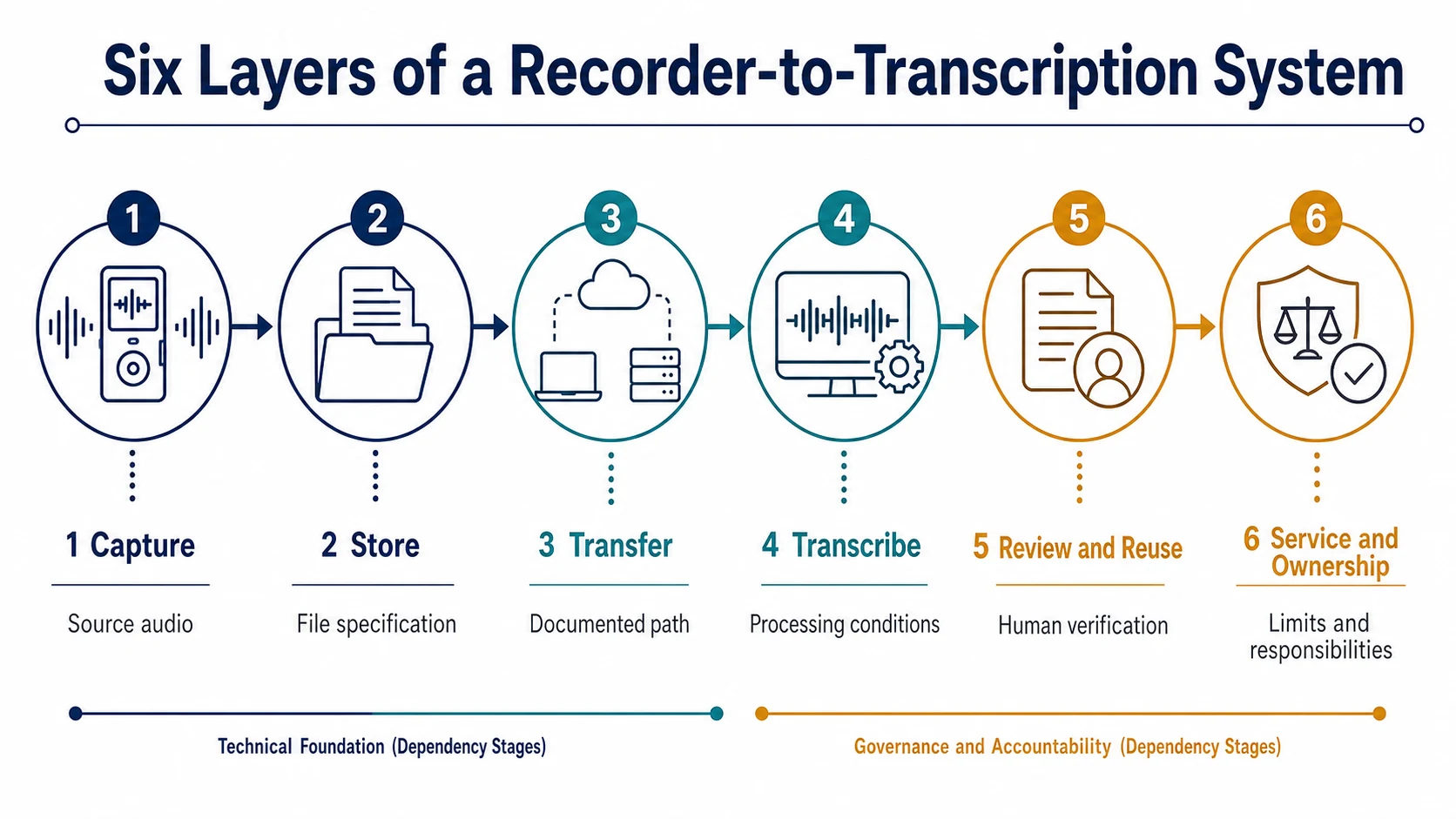
Use a Six-Layer Buying Model
Layer 1: Capture
The first layer is the sound that reaches the microphone. Buyers should test speaker distance, room reflections, ventilation noise, overlapping speech, quiet speakers, names, numbers, and technical vocabulary.
A transcript cannot reliably restore words that were never captured clearly. Microphone quantity alone also does not prove performance. Position, directionality, gain, processing, and room conditions matter.
Layer 2: Store
Confirm the file format, codec, sample rate, bit depth, channel count, naming convention, usable capacity, and deletion behavior. MDN’s media-container reference explains that WAVE is a container associated with audio data and can support more than one codec. “WAV recording” therefore does not provide enough information to calculate exact storage hours.
Layer 3: Transfer
Document every supported path from the recorder to a phone, computer, or service. Test a short and long file, interrupted transfer, duplicate naming, retry behavior, and whether the original can be exported without a continuing subscription.
Layer 4: Transcribe
Ask where recognition happens, which service is used, which languages are supported, whether speaker labels or timestamps are included, and whether a network is required. Do not accept “AI transcription” as an answer to all five questions.
Layer 5: Review and reuse
A transcript may feed summaries, action items, search, translation, mind maps, or downstream documents. Each output needs a responsible reviewer. Important names, quotations, quantities, dates, commitments, and compliance statements should be checked against the source audio.
Layer 6: Service and ownership
Map the hardware price, included minutes, additional usage, account limits, storage, support, retention, export, deletion, and what happens when the service ends. Plaud’s official Note page is one current example of a commercial device-plus-service model that combines hardware, local recording, an application ecosystem, included transcription minutes, and optional plans. Those terms describe Plaud, not every recorder.
Offline Recording Is Not Offline Transcription
This distinction should appear early in a procurement specification.
| Function | Can be offline in some systems? | What the buyer must verify |
|---|---|---|
| Start and stop recording | Yes | Exact device and configuration |
| Store original audio | Yes | Format, capacity, naming, playback, and export |
| Transfer a file | Sometimes | Cable, contacts, Bluetooth, Wi-Fi, or app requirement |
| Generate a transcript | Architecture-dependent | Processing location, language, account, and network |
| Translate or summarize | Architecture-dependent | Service, limits, data flow, and review process |
| Search across recordings | Architecture-dependent | Index location, account access, and retention |
Samsung’s Voice Recorder documentation provides a useful example of explicit workflow conditions. On supported devices, a user records, saves the file, selects it, chooses Transcribe, and can then review, summarize, translate, or share the output. The same page identifies device and operating-system requirements and notes that supported languages and service terms can vary.
That level of disclosure is what buyers should expect from any proposed system.
Original Audio and Transcript Serve Different Purposes
The transcript is faster to search, quote, summarize, and share. The source audio preserves tone, pauses, overlap, uncertainty, and the evidence needed to check a disputed phrase.
That distinction is especially important in an in-person AI meeting recorder workflow, where placement and source-file quality affect every downstream result.
A useful enterprise workflow links the two records without assuming they are interchangeable. It should answer:
- Can a reviewer jump from text back to the relevant audio?
- Can the source file be exported in a documented format?
- Are corrections preserved separately from automated output?
- Who can edit, share, download, or delete each record?
- Does deleting the audio also delete the transcript and summary?
- What remains after an account is closed?
Online platforms show why storage context matters. Microsoft Teams recording guidance connects meeting recordings to OneDrive or SharePoint, invitees, channel membership, and administrator-controlled expiration. A dedicated recorder service may use a different model, but it should be documented with similar clarity.
What Affects Transcription Results
Avoid reducing evaluation to one advertised percentage. Build a sample set that represents the buyer’s actual work.
Include:
- Quiet and noisy locations
- Near and far speakers
- Two people speaking at once
- Accents and speaking speeds common to the team
- Product names, customer names, acronyms, and technical terms
- Dates, model numbers, prices, and measurements
- A long recording that tests transfer and processing limits
Score the transcript by error type, not only by total words. A wrong filler word is different from a wrong customer name, quantity, or contractual commitment.
A polished summary can hide a poor source transcript. Review capture, transcript, and summary as three separate quality stages.
How the MG6 Fits the Workflow
The MG6 AI Recording Card can serve as the capture layer in selected B2B and OEM/ODM projects. The approved brief supports:
- Two omnidirectional microphones
- Offline WAV recording
- Storage options from 8GB to 128GB for project evaluation
- Bluetooth connectivity
- Magnetic charging and data-transfer contacts
- Up to 22 hours of working time under applicable use conditions
- Connected services that may provide transcription, summaries, mind maps, and other approved functions
- Phone-call recording by starting MG6 recording and using the magnetic case to attach the card to the back of the phone
The current product facts do not establish offline AI transcription, a fixed accuracy rate, automatic speaker identification, a specific timestamp format, unlimited AI usage, or one plan for every project. Those details must be confirmed in the selected AI-service and application dossier.
Sample Evaluation Checklist
Before approving a recorder with transcription, require the sample review to produce evidence.
- Capture evidence: matched audio files from realistic rooms and speakers.
- File evidence: format, codec, sample rate, bit depth, channel count, and sizes.
- Transfer evidence: steps, timing, retry behavior, and export path.
- Service evidence: processing location, network requirement, languages, limits, and billing.
- Output evidence: transcript corrections, summary review, and source-audio traceability.
- Governance evidence: account roles, sharing, retention, deletion, and offboarding.
- Commercial evidence: hardware, plan, support, replacement, and project terms.
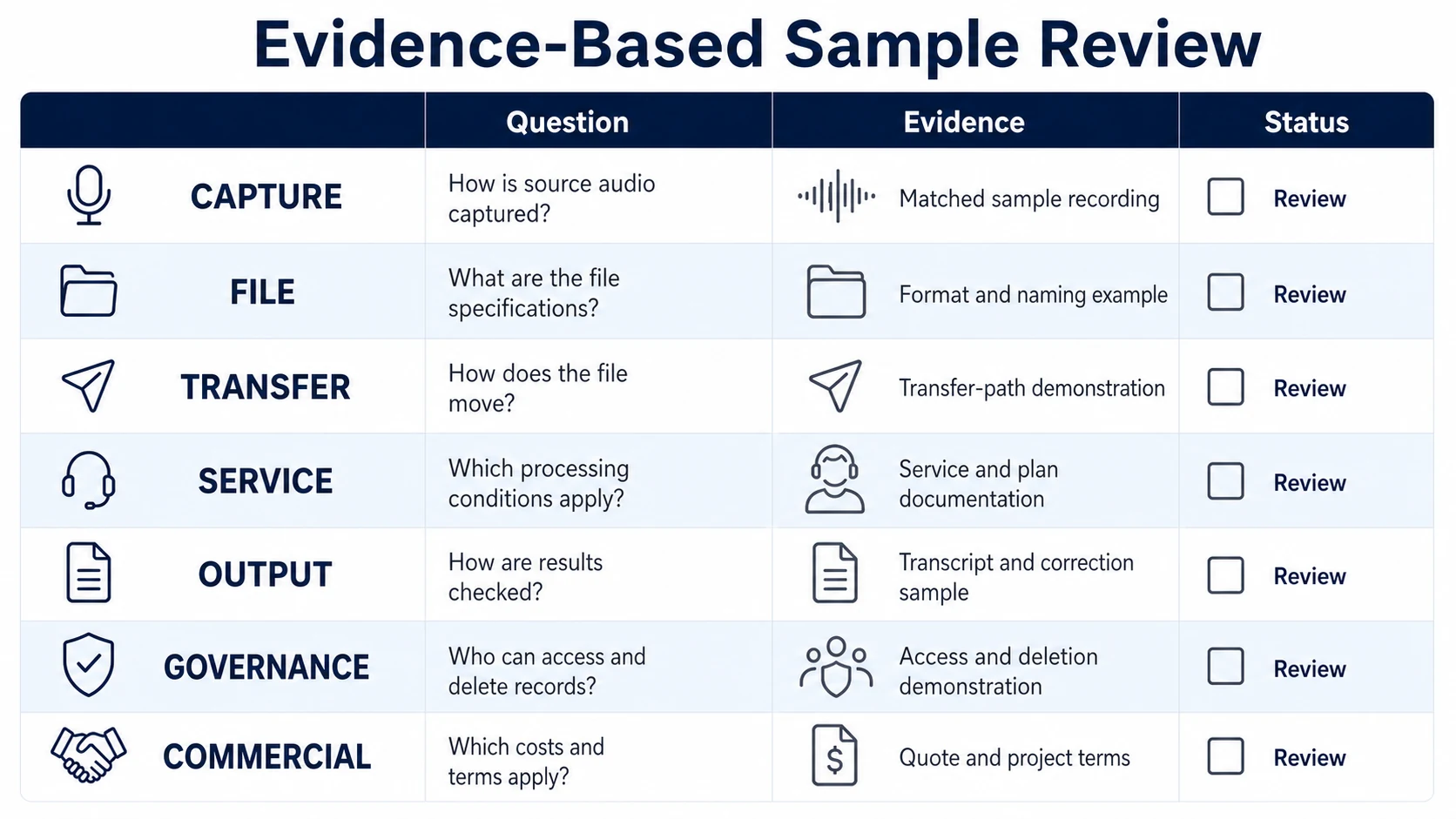
The result should be a repeatable acceptance standard, not a collection of screenshots from a supplier demonstration.
FAQ
Does a voice recorder with transcription work offline?
It may record and store audio offline, but transcription depends on the selected architecture. Verify capture, playback, export, transcription, translation, and summaries separately under an offline test.
Where is transcription processed?
It may be processed on the recorder, a phone, a computer, a meeting platform, or a cloud service. The supplier should identify the service, location, account requirement, and network condition.
Can the original audio be exported?
That depends on the product and plan. Test export before purchase, including file format, naming, transfer method, subscription dependency, and whether a usable copy remains when the account ends.
What affects transcription accuracy most?
Source-audio clarity, microphone position, speaker distance, background noise, overlap, accents, vocabulary, language support, and the recognition system all matter. Use matched real-world samples rather than a universal accuracy claim.
How should a business compare transcription costs?
Combine device price, included minutes, additional usage, user or workspace fees, storage, support, export, replacement, and expected recording volume. A low hardware price can be misleading when the service model is unclear.
Buy the Workflow, Not the Label
A useful voice recorder with transcription gives the buyer a clear path from source audio to reviewed text. Specify each layer, test realistic recordings, retain access to the evidence needed for correction, and document service responsibilities before rollout. For an MG6 project, request the hardware specification together with the selected application and AI-service dossier so the team can evaluate the complete system rather than infer AI capabilities from the recorder alone.


