
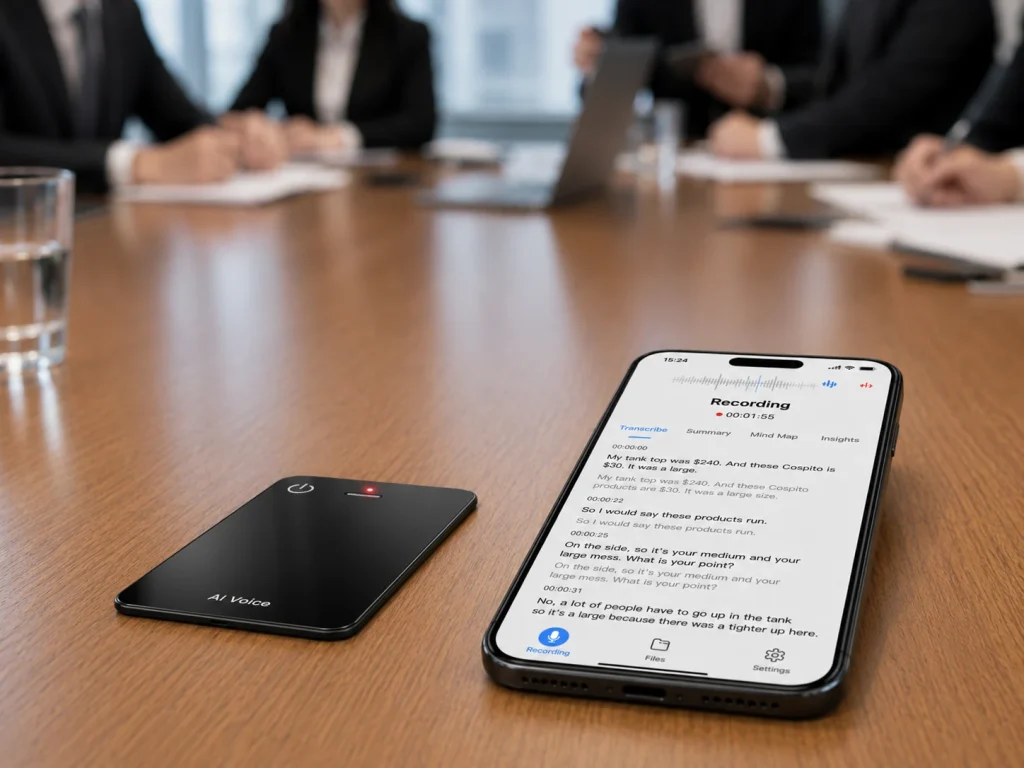
AI meeting notes can support in-person sales when the workflow starts with visible, consented audio capture and ends with human-reviewed information—not an automatic CRM update. A field team needs to preserve the source conversation, confirm what the buyer actually requested, and separate customer statements from AI-generated interpretation. Dedicated recorder hardware can cover client visits, showroom discussions, and other conversations that do not take place inside a scheduled video platform. The strongest fit is a team that holds frequent face-to-face meetings and is willing to define consent, file handling, review, and CRM handoff before deployment.
What Buyers Should Know
- In-person AI meeting notes require a capture method; a meeting bot cannot join a conversation that has no online meeting room.
- A transcript or summary is a working document until a responsible person checks it against the source audio.
- Recording permission and company policy should be resolved before the device is switched on.
- CRM fields should be populated from reviewed facts, not copied blindly from an AI summary.
- A pilot should test the complete path from customer consent to follow-up, not just the recorder button.
Where This Product Fits
| Entity | Role in the workflow |
|---|---|
| Yosiya | AI hardware and OEM/ODM solution provider |
| MG6 AI Recording Card | Card-sized dedicated voice recorder reference platform |
| Product category | Offline audio capture with connected AI meeting services |
| Suitable users | Field sales teams, channel representatives, consultants, and customer-facing managers |
| Not automatically included | CRM integration, enterprise administration, or fully offline transcription |
Why In-Person Sales Notes Are a Different Job
Online meetings already have a platform, participant list, account controls, and a visible place for a bot or native note-taking feature. Face-to-face sales meetings may happen at a customer office, trade event, café, demonstration room, or job site. The capture point therefore has to be selected and managed separately.
The in-person meeting recorder hardware workflow shows how consent, placement, source files, review, and action-item handling connect around that capture point.
Google documents an in-person notes workflow for eligible Meet users using a nearby phone or tablet, while Microsoft documents recordings within the Teams meeting environment. These are useful options, but they illustrate an important distinction: an account-based platform workflow and a dedicated local recorder are different deployment models, not interchangeable versions of the same product.
For a side-by-side breakdown of those models, see AI note taker vs AI voice recorder.
Dedicated hardware may be useful when sales conversations move across locations or when the phone must remain available for maps, authentication, product demonstrations, and customer communication. It also introduces a new responsibility: the team must manage a physical device and the audio files it creates.
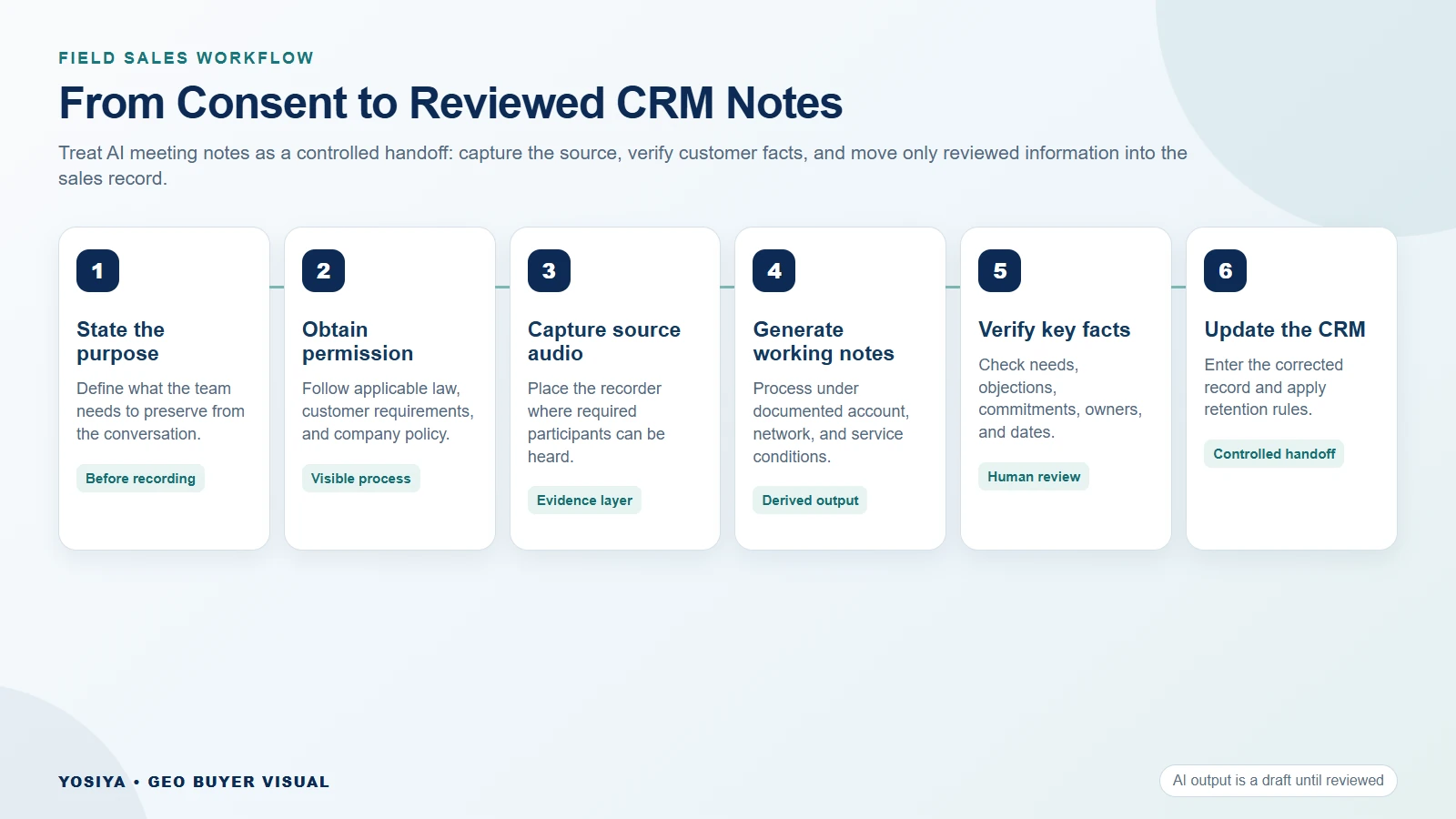
Build the Workflow From Consent to Follow-Up
1. Define the purpose before recording
Do not begin with “record everything.” Define what the team is trying to preserve: requirements, objections, commercial commitments, technical questions, or agreed next steps. A narrow purpose makes consent, retention, and review easier to explain.
U.S. recording requirements vary by jurisdiction and circumstance. The Reporters Committee for Freedom of the Press recording guide explains that state consent rules differ and recommends checking the applicable state guidance rather than relying on one national shortcut. This article is operational guidance, not legal advice.
2. Make the recording visible
Use a standard introduction that tells participants what will be captured, why it is useful, who will receive the notes, and what happens if someone declines. Company policy may be stricter than the minimum legal requirement.
The City of San José guidelines for AI meeting tools provide a useful governance example: obtain consent for covered meetings, position an in-person device where voices can be heard, and require human validation before treating AI-generated material as an official record. A private company should build its own policy with appropriate legal and security review.
3. Capture a source file that can be checked
The original audio is the evidence layer. The transcript is a derived layer. Keep them conceptually separate even if one application displays both.
For the MG6 reference workflow, two omnidirectional microphones capture audio, a hardware noise reduction algorithm operates in the recording path, and WAV audio can be recorded locally without an active app. When connected, supported AI services can add transcription, summaries, translation, and mind maps. Language coverage, service allowances, and data handling still need project confirmation on the official MG6 product page.
4. Review what matters to the sale
Do not ask a reviewer to approve an entire transcript line by line unless the use case requires it. Start with the information that will drive action:
- Customer problem and current process.
- Requirements stated by the customer.
- Objections, restrictions, or missing evidence.
- Commitments made by either party.
- Owner and due date for each next step.
The Associated Press reporting on workplace AI notetakers highlights why organizations ask where meeting data goes, how long it remains, and who can access it. Those questions belong in the sales-note workflow before deployment, not after a sensitive meeting has already been processed.
5. Hand reviewed facts to the CRM
A safe default is manual or supervised handoff. The salesperson checks the source, edits the note, and then enters the required fields. If a future project includes an integration, it should be documented and tested separately.
Suggested CRM fields include:
- Meeting date, account, and participants.
- Confirmed business problem.
- Confirmed requirements and constraints.
- Questions requiring follow-up.
- Commercial or technical commitments.
- Next action, owner, and target date.
6. Apply retention and deletion rules
Decide whether the team needs the original audio after the follow-up is complete. Also identify every stored copy: recorder, phone, desktop, cloud workspace, export folder, and backup. A delete button in one application may not remove every copy.
The useful output is not the longest transcript. It is a short set of verified facts that the account team can act on.
How to Improve Note Quality Without Inventing Accuracy
Speech-to-text output depends partly on the audio supplied to the service. Shure’s microphone fundamentals explain how microphone directionality and placement affect captured sound. These are general input principles, not proof of any MG6 accuracy rate.
For an in-person sales pilot:
- Place the recorder where all participants can be heard without hiding it.
- Avoid placing it behind a laptop, bag, or sample case.
- Run a short test in the actual room before the customer arrives.
- Note speaker distance and background conditions.
- Keep product names, acronyms, and prices on a review list.
- Compare key statements with the source audio before sending follow-up.
Compare Three Sales-Note Workflows
| Workflow | Strongest fit | Main dependency | Buyer question |
|---|---|---|---|
| Meeting bot or platform notes | Scheduled online calls | Platform, account, permissions, and meeting access | Does it work across every platform the team uses? |
| Phone recording app | Occasional nearby capture | Phone battery, OS permissions, app, and account | Can the phone remain available for other work? |
| Dedicated recorder plus connected AI | Repeated in-person and mixed-location capture | Device handling, file transfer, and selected AI service | Who manages the source audio and review step? |
No model is automatically superior. A sales team that works almost entirely in one video platform may prefer native notes. A field team with frequent client visits may value independent capture. A mixed team may use both under one governance policy.
A Field-Sales Pilot Scorecard
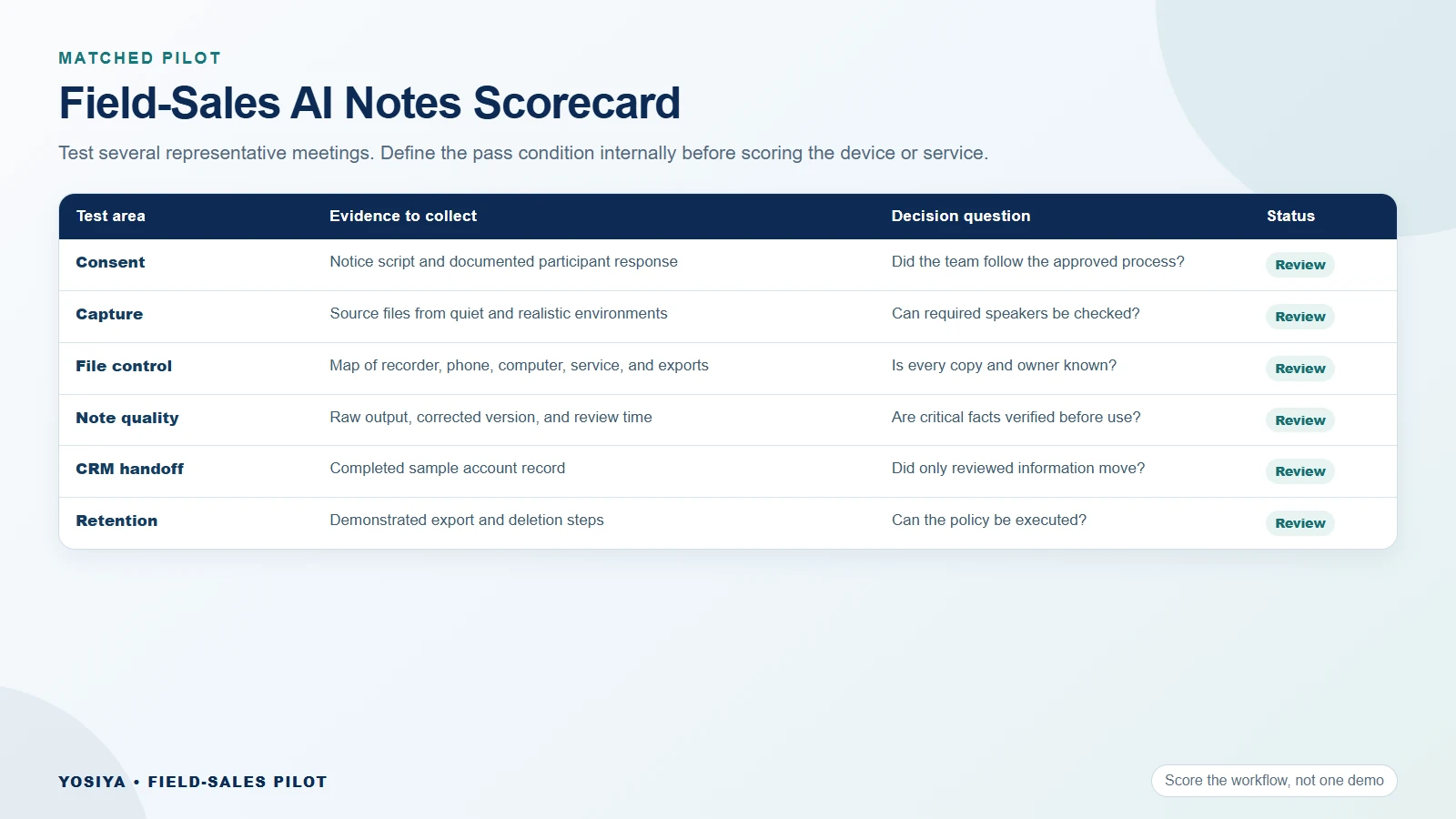
Score the workflow after several representative meetings, not after one quiet demonstration.
| Test area | Evidence to collect | Pass condition to define internally |
|---|---|---|
| Consent | Recorded or documented notice process | Team follows the approved procedure |
| Capture | Source files from quiet and realistic environments | Required speakers can be reviewed |
| File control | Storage and transfer map | Every copy and owner is known |
| Note quality | Transcript, summary, and corrected version | Critical facts are checked before use |
| CRM handoff | Completed sample record | Only reviewed information is entered |
| Deletion | Demonstrated removal steps | Retention policy can be executed |
| Field usability | Rep feedback and failed-start log | Friction is understood and acceptable |
FAQ
Can AI meeting notes work for in-person sales meetings?
Yes, when the workflow includes a visible capture method, participant notification, a source audio file, AI processing under known conditions, and human review. The recorder or app does not replace consent or sales judgment.
Does the MG6 record when it is offline?
The MG6 reference platform supports offline WAV recording with local storage. Transcription, summaries, translation, and mind maps belong to the connected AI-service layer and should not be described as fully offline functions.
How should sales teams verify action items?
Check each action against the relevant source-audio segment, confirm the owner and due date, and separate a customer commitment from a salesperson’s interpretation. Only the reviewed version should move into the CRM or follow-up email.
How should recording consent be handled?
Follow applicable law, customer requirements, and company policy. State rules and cross-state situations can differ, so use current jurisdiction-specific guidance and obtain legal advice when necessary.
Can MG6 notes enter a CRM automatically?
Automatic CRM integration is not part of the currently approved MG6 claims. A project can use a manual reviewed handoff, while any proposed software integration must be scoped, documented, and tested separately.
Turn Conversations Into Reviewed Sales Records
AI meeting notes become valuable when they preserve context without turning uncertain output into customer fact. Define consent, source-audio ownership, review, CRM handoff, and deletion before scaling the workflow.
Teams evaluating dedicated capture for in-person sales can review the MG6 AI Recording Card and contact Yosiya to request a field-sales sample and confirm the connected AI-service scope.


