
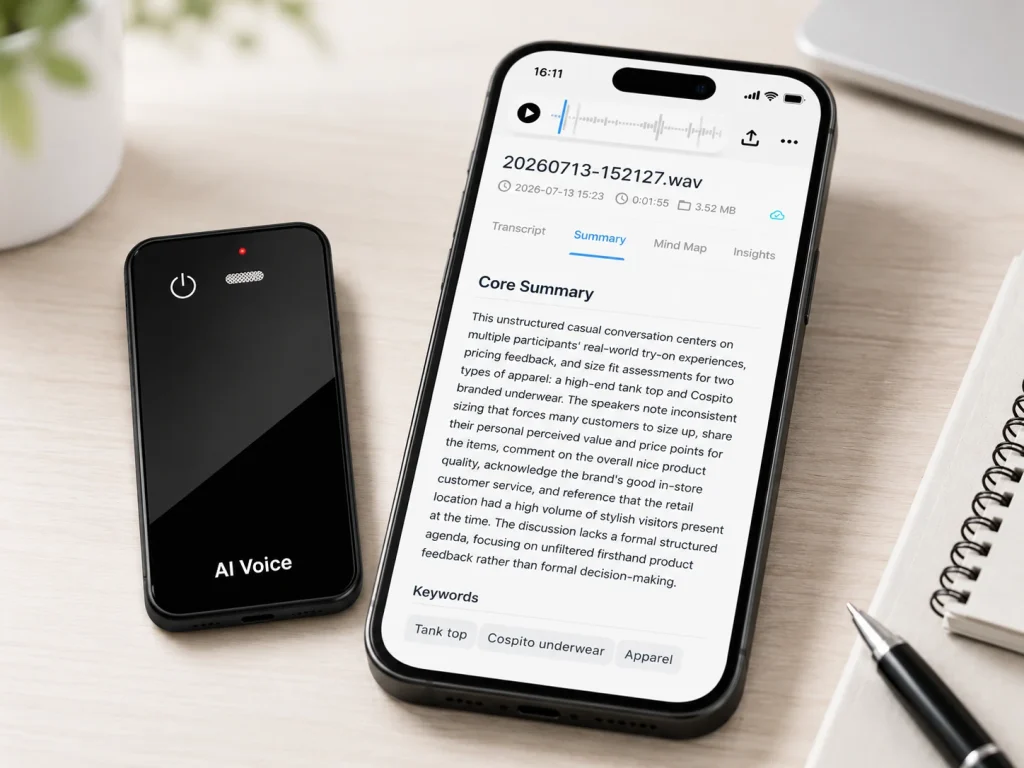
An offline voice recorder can capture and save audio without internet access; offline AI transcription converts that audio into text on a local device without sending it to a remote service. These are separate capabilities. A product may record perfectly in airplane mode and still require a phone, account, upload, or cloud processor before any transcript appears. Buyers should test recording, storage, transfer, transcription, summarization, and synchronization as different states. For the MG6 AI Recording Card, the confirmed offline function is local WAV recording. Connected transcription, summaries, translation, and mind maps depend on the selected application, service, and project configuration.
What Buyers Should Know
- Offline capture: the microphone records audio without a network.
- Offline storage: the source file remains on local device storage.
- Offline transcription: speech recognition runs locally and produces text without a network.
- Offline AI analysis: summaries or other language-model functions run locally without a remote service.
A seller should disclose each capability separately. “Works offline” is incomplete unless the buyer knows which step works, on which device, with which language pack or model, and what happens after reconnection.
Where This Product Fits
| Entity | Confirmed role |
|---|---|
| Yosiya | AI hardware and OEM/ODM solution provider |
| MG6 AI Recording Card | Dedicated card-sized recorder with local WAV capture |
| Offline boundary | Recording can continue without an active internet connection |
| Connected layer | Selected application and AI services handle transcription and other AI functions |
| Claim boundary | Do not describe MG6 as an offline AI transcription device unless a project-specific local engine is verified |
The broader B2B guide to AI voice recorders explains why capture hardware, transfer, processing, review, and reuse should be evaluated as separate layers.
Recording Is Not Recognition
IBM defines speech to text as the process of converting spoken words into a written transcript. A recorder can complete its job before that conversion begins: it captures an audio waveform and saves a file. Speech recognition requires a model, compute resources, language support, and an input path.
This creates several valid architectures:
- Record locally and review only the audio.
- Record locally, then upload the file for batch transcription.
- Stream audio to a cloud service for live transcription.
- Record and transcribe on the same phone or computer.
- Record on dedicated hardware, transfer the file, and transcribe on another local device.
None of these architectures is universally suitable. The right choice depends on network availability, privacy policy, language support, device management, response time, and the organization’s need to own the source file.
Follow the File Through Every State
A buyer can expose vague offline claims with one state-transition map.
| State | Network | Expected evidence | Buyer question |
|---|---|---|---|
| Start recording | Off | Visible status and new local file | Can the device begin without an account check? |
| Continue recording | Off | Stable audio through the full test | What happens after hours of capture? |
| Stop and replay | Off | Complete local source file | Can the user verify the recording immediately? |
| Transfer | Off or local link | File copied to approved destination | Does transfer require cloud access? |
| Transcribe | Defined by system | Text plus service or model record | Where does recognition run? |
| Reconnect | On | Documented sync or upload behavior | Does audio move automatically? |
| Delete | Both states | Confirmed removal from every location | What remains on device, phone, and service? |
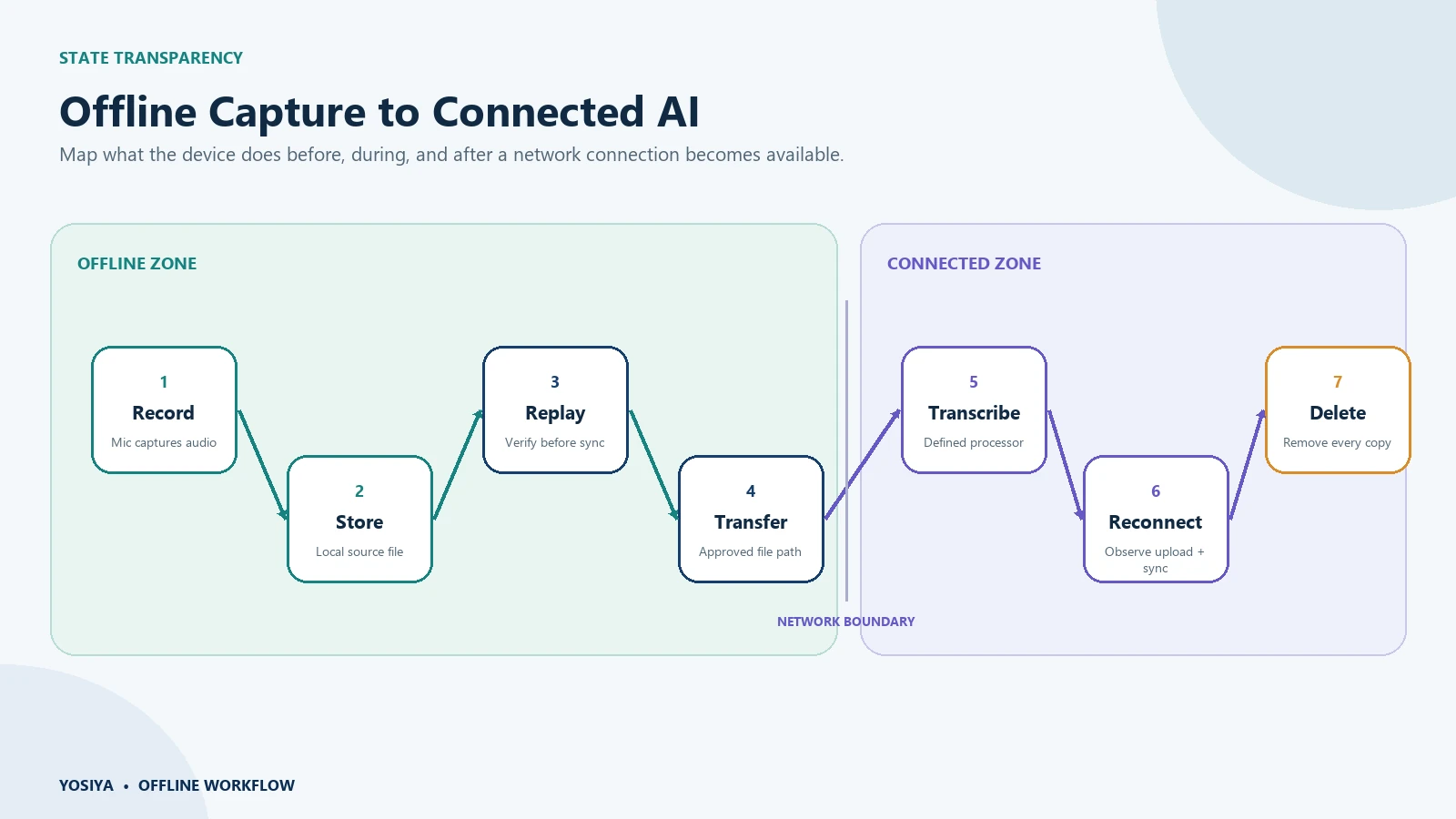
The key question is not simply whether the recorder “works offline.” It is whether the buyer can predict every state change before sensitive audio is created.
Cloud Transcription Has an Explicit Input Path
Official cloud documentation makes the architecture visible. Amazon Transcribe accepts either media files from Amazon S3 or a media stream. Its batch and streaming modes use different input rules and return transcript data through defined storage or streaming paths.
Google Cloud Speech-to-Text batch recognition similarly documents a long-running operation for audio stored in Cloud Storage. These examples do not describe every commercial recorder service, but they demonstrate the disclosure a buyer should expect:
- Where the audio comes from.
- Whether it is uploaded as a file or streamed live.
- Where the transcript is written.
- Which account and permissions control the job.
- What retention or deletion behavior applies.
If a recorder supplier cannot diagram those steps for the selected AI service, the offline claim is not ready for procurement.
Some Phones Combine Local and Connected Behavior
Phone workflows show why product-level assumptions are dangerous. Apple’s Voice Memos guide explains that recordings can sync through iCloud when the feature is enabled. Its separate transcription guide describes supported devices, languages, and regions for viewing transcript text.
Google’s Pixel Recorder transcription documentation also distinguishes device and server behavior; for example, it notes that some re-transcription may process audio on Google servers.
The lesson is not that one phone is more private than another. The lesson is that capture, transcription, backup, re-transcription, and sync settings can follow different paths inside the same product. Buyers should verify the specific device, OS version, language, account, and configuration they intend to deploy.
Run an Airplane-Mode Test That Produces Evidence
Do not accept a demonstration in which the supplier controls the phone, account, and network. Use a written test and save the result.
Phase 1: Prepare online
- Charge the recorder and phone.
- Confirm firmware, app version, storage, language, and service plan.
- Disable or document automatic backup and sync.
- Prepare a script with names, dates, numbers, and technical terms.
- Record the expected behavior for each step.
Phase 2: Disconnect completely
Enable airplane mode and turn off Wi-Fi. If Bluetooth or a local connection is needed for a defined step, document when it is re-enabled. Start a new recording, speak the script, pause if supported, resume, stop, and replay the result.
Phase 3: Inspect before reconnecting
Check whether a source file exists, where it is stored, whether it can be replayed, whether text appears, and whether the application shows queued work. Take screenshots or test notes without exposing sensitive content.
Phase 4: Reconnect deliberately
Observe whether audio uploads automatically, whether the user receives a prompt, which account processes it, how long the transcript takes, and where both audio and text appear.
Phase 5: Delete and verify
Delete the test from the recorder, phone, web account, recycle bin, and any export location as required. Confirm whether deletion propagates or must be repeated.
【图片插入位置:五阶段离线能力样机测试清单图,上传WordPress后替换为图片】
Compare the Architectures, Not the Labels
| Architecture | Main strength | Main limitation | Suitable condition |
|---|---|---|---|
| Local recorder, no transcription | Simple independent source capture | Manual review is slower | Audio evidence matters more than searchable text |
| Local recorder plus later cloud AI | Capture survives network loss; connected AI available later | Upload, account, and service policy must be governed | Field or meeting capture with approved cloud processing |
| Phone with on-device transcription | Fewer devices and possible local text | Feature and language support depend on phone and OS | Individual users on a controlled device fleet |
| Streaming cloud transcription | Text can appear during the conversation | Continuous connectivity and remote processing are required | Supported online or live-caption workflows |
| Recorder plus local desktop model | Source capture and recognition can stay local | Compute, model deployment, updates, and support move to the buyer | Privacy-sensitive teams with technical operations capability |
The AI note taker vs AI voice recorder comparison provides a broader decision framework for software, platform, and dedicated-device models.
Procurement Disclosures to Require
Ask the supplier to answer these questions in writing:
- Can recording start, continue, stop, replay, and export without internet?
- What file format and storage location apply while offline?
- Does the app require an account check before recording or transfer?
- Where does transcription run for each supported language?
- What is queued while disconnected, and what happens automatically after reconnection?
- Which functions depend on a paid plan, allowance, or third-party service?
- Can automatic upload, backup, or synchronization be disabled?
- How are audio, transcript, summary, and service logs deleted?
- Which behaviors can change after firmware, application, or service updates?
- What evidence will be used to accept the production version?
For MG6, buyers should request the offline/connected workflow sheet for the proposed configuration. The confirmed baseline is offline WAV capture with local storage; AI-service behavior must be matched to the selected project.
FAQ
Can MG6 record without Wi-Fi?
Yes. The confirmed MG6 workflow supports offline WAV recording to local storage. This statement applies to capture, not automatically to transcription, summaries, translation, or mind maps.
Does offline recording mean the audio never reaches the cloud?
No. It means the recording step can occur without a network. The file may later upload or sync when a phone, application, or service reconnects. Review the complete data flow and settings.
Can a recorder transcribe locally after the meeting?
Yes, if the buyer provides a compatible local transcription engine on the recorder, phone, or computer. That engine, language support, hardware requirements, and export process must be verified separately from the recorder.
What is the fastest way to test an offline claim?
Use airplane mode, create a new recording, replay and inspect the source file before reconnecting, then observe every upload, processing, sync, and deletion event after the network returns.
Is offline transcription always the safest option?
Not automatically. It can reduce remote processing, but device loss, weak access control, backups, local malware, retention, and unreviewed exports still create risk. Security depends on the whole system.
Define Offline as Observable Behavior
An offline voice recorder and an offline AI transcription system solve different problems. Buyers can avoid misleading claims by testing the states separately and requiring a diagram that identifies every device, account, file, processor, and automatic transition.
Review the MG6 AI Recording Card or request the current offline and connected workflow. Use the exact proposed application and service configuration during sample testing before publishing an offline claim.


